Simple Viewer GL is a lightweight, hardware-accelerated image viewer using OpenGL.


The primary goal of Simple Viewer GL is to provide a fast, efficient image viewer with only the essential features required for quick image browsing. It includes vi-like key bindings and integrates seamlessly with tiling window managers such as ion3/notion, i3wm, dwm, xmonad, hyprland, sway, and others.
Supported formats include PNG (including Apple CgBI), JPEG, JPEG 2000, PSD/PSB (Adobe Photoshop), AI (Adobe Illustrator), EPS, XCF (GIMP), GIF, SVG, TIFF, DNG, TARGA, ICO, ICNS (Apple Icon Image), BMP, PNM, DDS, XWD, SCR (ZX-Spectrum screen), XPM, WebP, OpenEXR, HEIF/HEIC, AVIF, AGE, and many more.
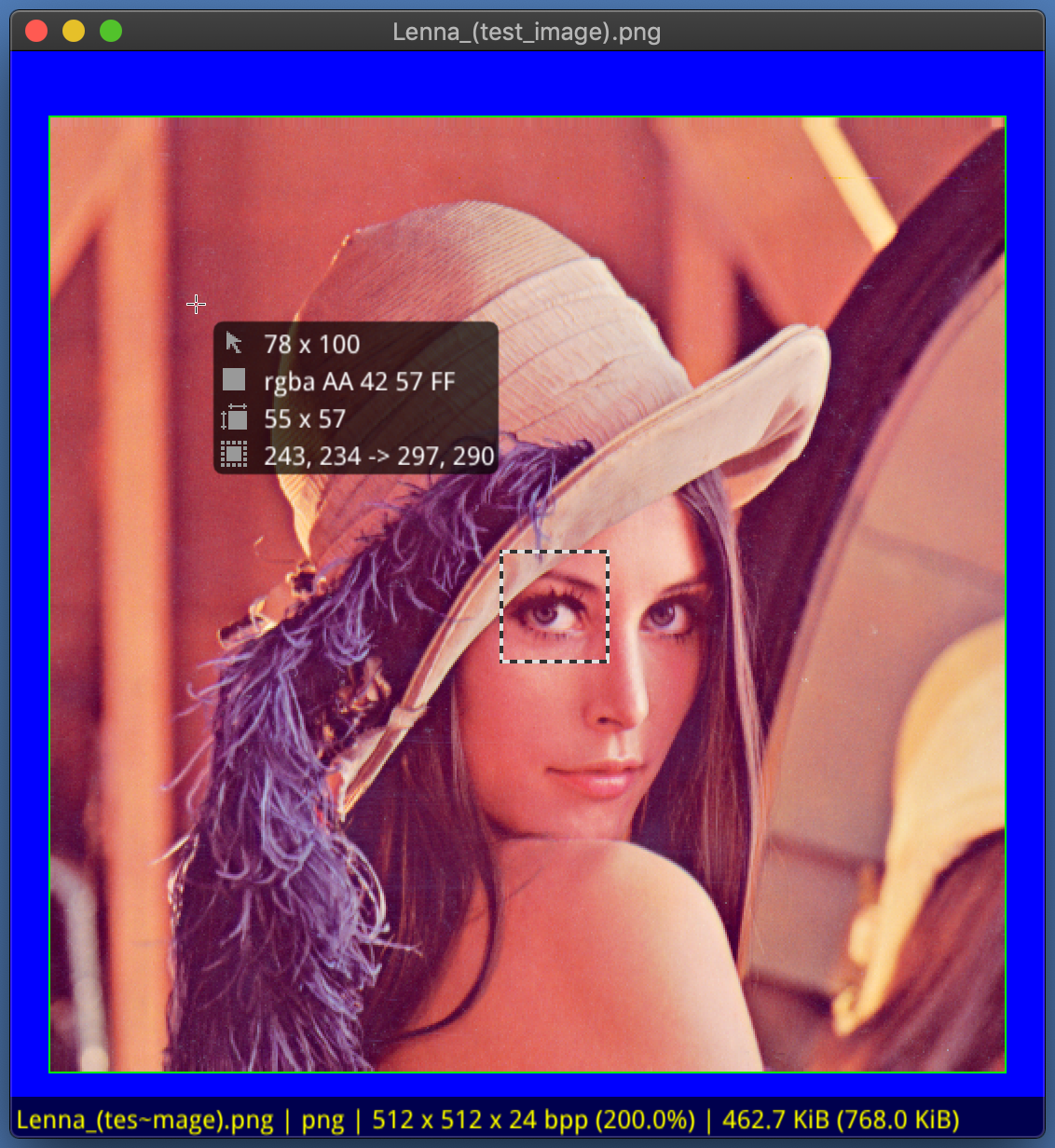
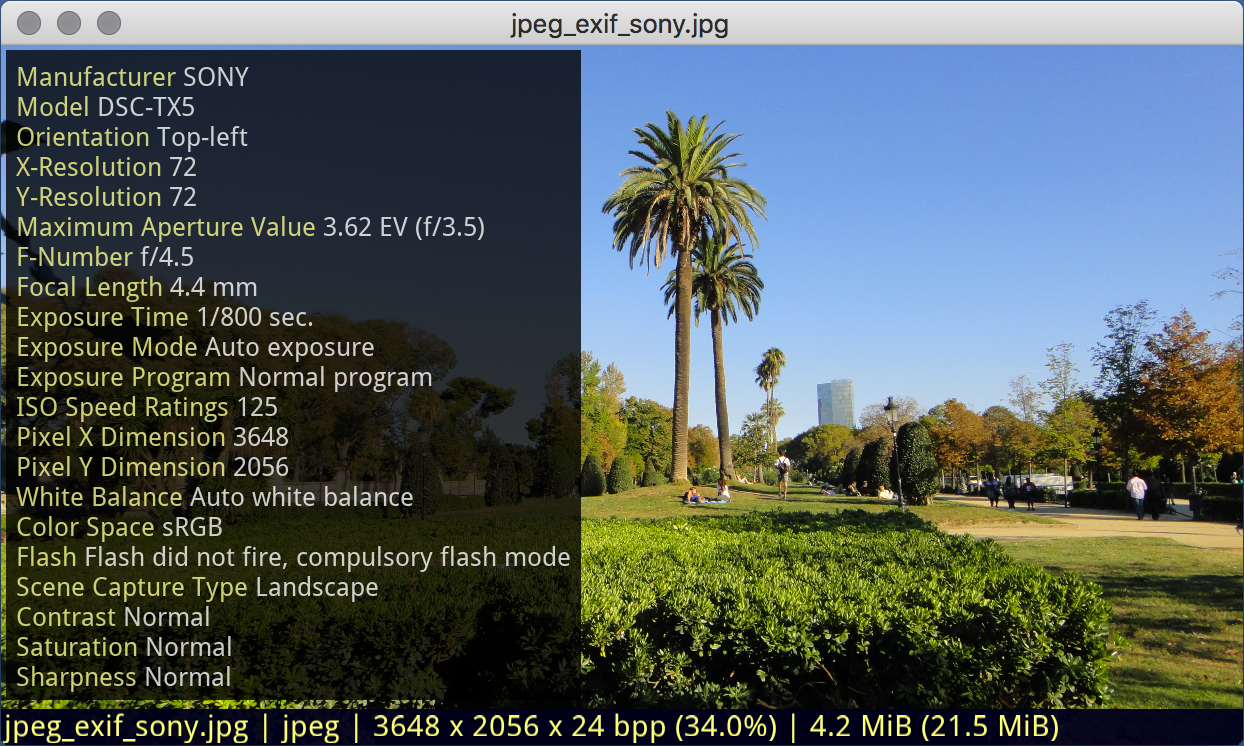
- Lightweight and fast: hardware-accelerated rendering via OpenGL
- ICC color management via GPU 3D LUT (PNG, JPEG, JPEG 2000, TIFF, WebP, BMP, PSD/PSB, EPS, ICO, ICNS, HEIF/HEIC, AVIF)
- Automatic EXIF orientation correction
- Image rotation and flip (rendered via projection matrix, no bitmap transform)
- GIF animation support
- GIMP XCF support
- Adobe PSD/PSB format support (RGB, CMYK, Grayscale, LAB, Duotone, Indexed; RAW, RLE, ZIP compression)
- HEIF/HEIC and AVIF format support with EXIF and ICC profiles
- Adobe AI, EPS formats preview support
- SVG format support
- EXIF metadata display
- Pixel-level inspection with color readout
- Built-in file browser
- Very simple interface with vi-like keybindings
- Suitable as a default image viewer for desktops and laptops
- Desktop independent: no specific desktop environment required
- Supports macOS and Linux (Windows planned)
- Open source, licensed under GNU GPL v2
Simple Viewer GL offers two modes: Image Viewer and Image Info mode. By default, it opens in Image Viewer mode, displaying only the current image. In Image Info mode, additional features such as pixel information and rectangular selection are available, making it useful for quickly reviewing image details and metadata.
- Yellow statusbar indicates the default mode.
- Green statusbar indicates the mode where the image viewer resizes its window to the content size and centers itself on the screen.
| Hotkey | Action |
|---|---|
<esc> |
exit |
<space> |
next image |
<backspace> |
previous image |
<home> |
first file in list |
<end> |
last file in list |
<o> |
open file dialog |
<+> / <-> |
scale image |
<1>...<0> |
set scale from 100% to 1000% |
<enter> |
switch fullscreen / windowed mode |
<arrows> / <h/j/k/l> |
pan image by pixel |
<shift> + <arrows/hjkl> |
pan image by step |
<del> |
toggle deletion mark |
<ctrl> + <del> |
delete marked images from disk |
<r> |
rotate clockwise |
<shift> + <r> |
rotate counterclockwise |
<f> |
flip horizontal |
<shift> + <f> |
flip vertical |
<pgup> / <pgdn> |
previous / next subimage |
<s> |
fit image to window |
<shift> + <s> |
toggle 'keep scale' on image load |
<shift> + <c> |
toggle 'center image' mode |
<c> |
cycle background |
<i> |
hide / show on-screen info |
<e> |
hide / show exif |
<p> |
hide / show pixel info |
<b> |
hide / show border around image |
<g> |
hide / show pixel grid |
<?> |
hide / show keybindings popup |
| Library | Debian package | Fedora package | Required | Notes |
|---|---|---|---|---|
| CMake | cmake | cmake | yes | Build system (>= 3.22) |
| OpenGL | libgl1-mesa-dev | mesa-libGL-devel | yes | Hardware-accelerated rendering |
| GLFW3 | libglfw3-dev | glfw-devel | yes | Window and input management |
| zlib | zlib1g-dev | zlib-devel | yes | Compression |
| libpng | libpng-dev | libpng-devel | yes | PNG format |
| libjpeg | libjpeg-dev | libjpeg-turbo-devel | yes | JPEG format |
| libexif | libexif-dev | libexif-devel | EXIF metadata | |
| lcms2 | liblcms2-dev | lcms2-devel | ICC color management | |
| OpenJPEG | libopenjp2-7-dev | openjpeg2-devel | JPEG 2000 format | |
| giflib | libgif-dev | giflib-devel | GIF format (animated) | |
| libtiff | libtiff-dev | libtiff-devel | TIFF format | |
| libwebp | libwebp-dev | libwebp-devel | WebP format | |
| OpenEXR | libopenexr-dev | openexr-devel | OpenEXR format | |
| libheif | libheif-dev | libheif-devel | HEIF/HEIC/AVIF formats | |
| curl | libcurl4-openssl-dev | libcurl-devel | HTTP/HTTPS/FTP loading |
git clone https://github.com/reybits/simple-viewer-gl.git
cd simple-viewer-gl
make release
On success, the sviewgl binary (or Simple Viewer GL.app on macOS) is produced in the current directory.
sudo make install              # installs to /usr/local by default
sudo make install PREFIX=/usr  # or specify a custom prefix
This installs the binary, desktop entry, and icons.
# Import the signing key
curl -fsSL https://reybits.github.io/simple-viewer-gl/pubkey.gpg | sudo gpg --dearmor -o /usr/share/keyrings/sviewgl.gpg

# Add the repository (replace DISTRO with: noble, plucky)
echo "deb [signed-by=/usr/share/keyrings/sviewgl.gpg] https://reybits.github.io/simple-viewer-gl DISTRO main" | sudo tee /etc/apt/sources.list.d/sviewgl.list

# Install
sudo apt update
sudo apt install sviewglInstall build dependencies and build the .deb package:
sudo apt-get install build-essential debhelper cmake pkg-config \
    libgl1-mesa-dev libglfw3-dev zlib1g-dev libpng-dev libjpeg-dev \
    libexif-dev liblcms2-dev libopenjp2-7-dev libgif-dev libtiff-dev \
    libwebp-dev libopenexr-dev libheif-dev libcurl4-openssl-dev

git clone https://github.com/reybits/simple-viewer-gl.git
cd simple-viewer-gl
make debInstall build dependencies and build the RPM package:
sudo dnf install gcc-c++ make cmake pkgconfig mesa-libGL-devel glfw-devel \
    libpng-devel libjpeg-turbo-devel zlib-devel libexif-devel lcms2-devel \
    openjpeg2-devel giflib-devel libtiff-devel libwebp-devel openexr-devel \
    libheif-devel libcurl-devel

git clone https://github.com/reybits/simple-viewer-gl.git
cd simple-viewer-gl
make rpmAn ebuild is provided in dist/gentoo/. USE flags: lcms, exif, jpeg2k, gif, tiff, webp, exr, curl.
brew tap reybits/homebrew-tap
brew install simple-viewer-gl
To link the app to Applications:
ln -sf "$(brew --prefix)/opt/simple-viewer-gl/Simple Viewer GL.app" "/Applications/Simple Viewer GL.app"Example config is in config.example. Copy it to $XDG_CONFIG_HOME/sviewgl/config (defaults to $HOME/.config/sviewgl/config).
Copyright (c) 2008-2026 Andrey A. Ugolnik. All Rights Reserved.
https://github.com/reybits
and@reybits.dev

Icon was created by
Iryna Poliakova (iryna.poliakova@icloud.com).