


A Home Assistant custom integration for controlling smart adjustable beds via Bluetooth.
- Install via HACS: Search for "Adjustable Bed" and install
- Discover your bed automatically, or add manually via Settings → Integrations
- Control your bed from Home Assistant dashboards, automations, and voice assistants!
- Native Dashboard Card - Auto-loading Lovelace card that adapts to your bed (details)
- Paired Beds - Left, Right, and Both controls for compatible split beds, with reversible conversion of existing entries
- Motor Control - Raise/lower head, back, legs, and feet
- Position Control - Position sliders in degrees or percentages, according to the controller
- Memory Presets - Jump to saved positions with one tap
- Under-bed Lights - RGB color control on supported beds, toggle on/off on others
- Climate Controls - Cooling, heating, and footwarming on supported beds
- Massage Control - Adjust massage intensity and patterns
- Position Feedback - See current angles on supported beds
- Presence Sensors - Occupancy sensors on supported beds
- Firmness Controls - Sleep Number settings on supported beds
- Automations - "Flat when leaving", "TV mode at 8pm", etc.
| Guide | What's Inside |
|---|---|
| Troubleshooting | Connection issues, commands not working |
| Getting Help | Bug reports, support requests, diagnostics |
| Connection Guide | ESPHome proxy setup, finding your bed's address |
| Configuration | Settings, choosing your remote, combining and splitting beds |
| Actions and Automations | Movement, memory, side targeting, and bed-specific actions |
| Wake-up automation | Import a scheduled bed raise or memory recall with optional lighting |
| Apple Home and Siri | Raise, lower, and stop commands through HomeKit scenes or Siri Shortcuts |
| Supported Actuators | Protocol details, bed brand lookup |
See the documentation index for migration and developer guides.
| 🐛 Report a Bug | Broken controls, connection failures, or regressions |
| 💡 Request a Feature | Missing capabilities and improvements |
| 🛏️ Request Bed Support | Unsupported bed brands or models |
| 💬 Ask a Question | How to configure or use the integration |
| ❤️ Praise and Feedback | Share your experience or say thanks |
Issues track work; Discussions host help and community conversations. You do not need to prove a problem is a bug before reporting it. See how reports are handled.
Quick troubleshooting
- Check range - Bluetooth adapter or proxy within ~10m of bed
- Disconnect other apps - Most beds allow only one BLE connection
- Reload integration - Settings → Devices & Services → Adjustable Bed → Reload
- Enable debug logs - Settings → Devices & Services → Adjustable Bed → ⋮ menu → Enable debug logging. Reproduce issue, then disable to download logs.
Enjoying Adjustable Bed? Sponsoring its development is a lovely way to say thanks and help keep the project growing.


Find your manufacturer, brand or app below. Related models and apps are grouped together; the linked guides explain which selection to use during setup. If you only know your bed's retail brand, check the Supported Actuators guide.
| Manufacturer or brand | Supported brands, models and apps |
|---|---|
| ✅ Linak | Tempur-Pedic, Bedre Nætter, Jensen |
| ✅ Keeson | Ergomotion, Tempur, Beautyrest, King Koil, Member's Mark, Purple, GhostBed, ErgoSportive; Adjustable Lite, Simon Li / Heal Every Night / OKIN-Seating, INNOVA, MaxCoil Una / Dynasty Bases / Bedsense Bases / Avanti Bases / AMERICANSTAR, Restonic BT |
| 🧪 Casper Base app | PRO / MAX, conditional stored products, separate MM/SXB sensors and RCRM remote; artifact-proven, hardware unverified |
| 🧪 Hush Base app | L200–L500 and S175–S575 including SH variants; explicit restored profiles, independent MM/SXB sensors and RCRM handset; hardware unverified |
| 🧪 GM Control app | Exact product catalogs, FWRM/WFRM desks, separate MM/SXB sleep modules; hardware unverified |
| ❓ Avocado Eco Base / CoasterSleep / Forty Winks / Milemont / Superior | Explicit app and four-character layout; separate package-local catalogs, direct BLE controls and settings; hardware unverified |
| ✅ Richmat | Casper, MLILY, Sven & Son, Avocado, Luuna, Jerome's; RMControl, Revive Control / Best Mattress / Blvd Home / HARMONY / Idealbed; ❓ RUF Motor 2 / W.Silver Products / AMERICANSTAR (Richmat) / Bailey's Bed Control / TX and separate sleep receiver |
| ✅ MotoSleep | HHC, Power Bob, binary MOTO models |
| ✅ OCTO Smart Control | OCTO Smart Control; Star2 is a separate variant |
| ✅ Solace | Solace, Sealy, QMS, Woosa Sleep |
| ✅ Leggett & Platt | Prodigy LBR (LP Comfort Connect), Prodigy Comfort Elite / CE; Prodigy 2L / 2 / 4 and U / Ultra Series, L&P Adjustable Base |
| ✅ Reverie | Reverie app (Protocol 108), Reverie Nightstand app (Protocol 110), R510L / Harmoniq Upgrade (Pairlink) |
| ✅ Okimat/Okin | Lucid, CVB, Smartbed, RF ECO BT bed receivers |
| ✅ Customatic | Clarity, Jerome's C, Remedy; Z-Series Z-230 / Z-280 |
| 🧪 AdjustaMattress | AdjustaMattress app, four BLE models and seven product layouts (hardware unverified) |
| Comfort Enhancements app, explicit MC2/MC3/MC4/MC5 layouts (hardware unverified) | |
| ✅ Jordan's | Serenity, Tranquil |
| ✅ SIMMONS | SIMMONS app, regular and inclined beds |
| ✅ Adjustable bed (Lumbar) | Adjustable bed (Lumbar) app, head/foot/lumbar controls |
| ❓ eShine E2000 / E3000 / E3100 / E5000 | eShine app (com.okin.eshine), explicit products, held presets, massage/light feedback and local alarm (needs testing) |
| ✅ Eshine E6000 | Eshine app, fixed four-axis controls and received-state diagnostics (hardware unverified) |
| ✅ FSM Relax | Chair and bed layouts, eight local memories |
| ✅ Okin 64-Bit | NORA_CON / NORACON Mattress Firm controllers |
| ❓ Good Vibe Sleep | Exact app catalog, remote aliases and independent RM-/HJ- sleep sensors; hardware unverified |
| ❓ MotoMotion | 13 panel classes, independent name flags, local postures and ASCII/binary music; hardware unverified |
| 🧪 HJBed app | 19 current and 24 conditionally restored profiles; artifact-proven, hardware unverified |
| ✅ Glideaway Motion / Montion app | MOTION 400 / 450 / 500 / 600, artifact-proven and hardware unverified |
| ✅ Jiecang | Glideaway, Dream Motion, LOGICDATA; ERGOBALANCE / Dream Motion / Dream Motion HD apps, Comfort Motion app |
| ✅ Kaidi | Rize Remedy III / newer Mouselet-based Rize beds, Floyd Home; legacy ISleep entries |
| 🔬 ISleep | Explicit com.kaidi_test4 1.6.3 profile, products 129–134, 142, 143 (artifact verified, hardware unverified) |
| ✅ Limoss | Limoss, Stawett; Limoss Remote bed and chair layouts |
| ✅ Jensen | Jensen (JMC400, LinON Entry) |
| ✅ Svane | Svane Remote, JMC400, Jensen LinOn |
| ✅ DewertOkin | Many older Rize models, Simmons, Nectar, Resident, Symphony |
| ✅ Serta | Serta Motion Perfect |
| ✅ Mattress Firm 900 | iFlex / older Nordic UART bases |
| ✅ Nectar | Nectar |
| ✅ Malouf/Lucid | Malouf, Lucid, Structures; Malouf Base / Lucid Base apps |
| ✅ BedTech | BedTech |
| ✅ Sleep Number | Climate 360, FlexFit, FlexFit Smart, i8 / 360 FlexFit 2 |
| 🧪 BedSense app | com.fenmenbielei.bedsense, nine layouts, memory, circulation, massage and light durations; artifact-proven, hardware unverified |
| 🧪 OKIN SleepEase | DoubleSleep / XiaoBao and sensor-only XiaoBao Only; artifact-proven, hardware unverified |
| 🧪 Tempur Sleeptracker-AI | Select for ProSmart / ProSmart Air and ActiveBreeze beds using this app; verified processor endpoint required; artifact-proven, hardware unverified |
| ✅ Sleepy's Elite | Sleepy's BOX15 / BOX24 / BOX25 and the explicit Sleepy's Elite app profile |
| ✅ AdjustableM5X4 / M5X5 | M5X4; M5X5 CB25, F23 and kneading layouts, with ELEVATE lifts |
| 🧪 Adjustable Comfort M1X12 app | Explicit CB25, F23 or kneading app profile, with up to two explicitly configured M1X12 ELEVATE accessories |
| ✅ SleepSpa S9000AI | SleepSpa S9000AI (SLEEPSTAR) |
| ✅ Vibradorm | Caresse / Werkmeister, VMAT, V-MAT Basic / CBI / XT-Box |
| ✅ SUTA Smart Home | SUTA |
| ✅ TiMOTION AHF | TiMOTION |
| ✅ Rondure | 1500 Tilt Base |
| ✅ Remacro | Slumberland, The Brick, Jerome's |
| ✅ Cool Base | Cool Base (Keeson with fan) |
| ✅ Scott Living | Scott Living |
| ✅ SBI/Q-Plus | Q-Plus (Costco) |
| 🧪 Tempur Curve app | Explicit com.ore.tempur app profile; static artifact proven, hardware unverified |
| 🧪 Q-Plus Adjustable Remote app | H/M1/M2/M3/MX app layouts, separate from generic SBI; hardware unverified |
| 🧪 Serta MP Remote app | Calibrated angle targets and local memories, separate from Motion Perfect; hardware unverified |
| 🧪 Omazz Adjusto III app | Reachable RemoteB controls and alarm tables; hardware unverified |
| 🧪 Ergomotion 4.0 | Explicit H/M1–M22/M30 layouts and 21 catalog products; P1 Left/Right/Both, RGB, massage and alarms; hardware unverified |
| 🧪 Ergomotion app | Explicit B1/B2/C1/D1 app layouts; hardware unverified |
| 🧪 ROW Control app | Elevate, Lifestyle, Curve, Lifestyle Plus and Zero-G Box; hardware unverified |
| 🧪 Ergo Slim app | Explicit A/B/C app layouts; hardware unverified |
| 🧪 TEMPUR AU app | Explicit B1/B2/C1/D1/E1 app layouts; hardware unverified |
| ✅ LOGICDATA | SILVERmotion, SimplicityFrame; MOTIONrelax, Sleep Smart Vienna / Toronto / Middle Rail and air mattress pump |
| ✅ Okin CB35 | Sealy Posturematic |
| ✅ DewertOkin ELEVATE | ELEVATE two-actuator lift accessory, also an AdjustableM5X5 lift; M1X12 app groups require its explicit M1X12 variant |
| 🧪 BF / Cherish | BF 1.2.3 and Cherish 1.0.4 apps, explicit profiles; hardware unverified |
| ✅ Okin CST | Rize Sanctuary, Resident, Aviada, Bob, Contempo, II Carefree, II Clarity, MF900; Support; Mattress Firm 900-O / MFirm 900-O; explicit Nectar Move app profile |
| ✅ Motion Bed | QMS/SealyMF and TL beds, air and thermal controls |
| ✅ FurniMove / OKIN Smart Remote | App handset layouts, including RF ECO BT adjustable-bed receivers |
| ✅ OKIN Smart Remote / RF ECO BT | Elda BTH / MEGAMAT staircase actuator |
| ✅ Okin DOT | DewertOkin RF34/RF6707 handset beds (new RF1058 setups use FurniMove) |
| ✅ BedJet PowerLayer | BedJet PowerLayer adjustable frame (not the BedJet climate unit) |
✅ means supported by the integration. 🧪 marks app behavior implemented from accepted artifact evidence while hardware remains unverified. Each linked guide records its testing status. When setup asks for an app, model or remote, choose the one supplied with your bed. Grouping them here does not make their commands interchangeable.
Have one of these? Let us know how well it works!
Some brands use more than one controller family. Let auto-detection identify the controller, or consult the brand and protocol guide when choosing manually.
Just try it! The integration auto-detects most beds. Install it and see if your bed shows up.
Didn't auto-detect? Check the Supported Actuators guide to find your bed's actuator brand, then add it manually.
Still stuck? Request bed support with your bed brand/model and we'll help!
Other beds: Eight Sleep has its own integration.
WiFi and cloud-based beds won't be supported — this is a Bluetooth-only integration for the reasons stated in the link.
Requires Home Assistant 2026.9.0 or newer.
- Open HACS in Home Assistant
- Search for "Adjustable Bed"
- Install/download the latest stable version
- Restart Home Assistant
Use a release archive, or check out main for the current development
code. Copy custom_components/adjustable_bed to your
config/custom_components/ directory and restart. The committed frontend bundle
is included; an end-user installation does not require Bun or a frontend build.
Your bed should auto-discover via Bluetooth. If not:
- Go to Settings → Devices & Services → Add Integration
- Search for "Adjustable Bed"
- Enter your bed's Bluetooth address or select from discovered devices
To adjust settings after setup, click Configure (the gear icon) for the integration entry in Settings → Devices & Services, then Change settings.
Quick reference
| Setting | Description |
|---|---|
| Motor Count | Layout for profiles that expose a configurable count; Standard OCTO follows its advertised count unless an explicit override is selected |
| Has Massage | Enable if your bed has massage |
| Protocol Variant | Usually auto-detected, override if needed |
| Motor Pulse Settings | Fine-tune movement timing |
| Disable Angle Sensing | Turn off for supported position feedback; turn on if monitoring conflicts with the remote |
| Disconnect After Command | Release the connection one second after operations finish, where supported |
| Jensen PIN | 4-digit PIN for Jensen beds (default: 3060) |
| Octo PIN | 4-digit PIN for Octo beds that require authentication |
| Richmat Remote | Remote model code for Richmat beds |
See the Configuration Guide for all options.
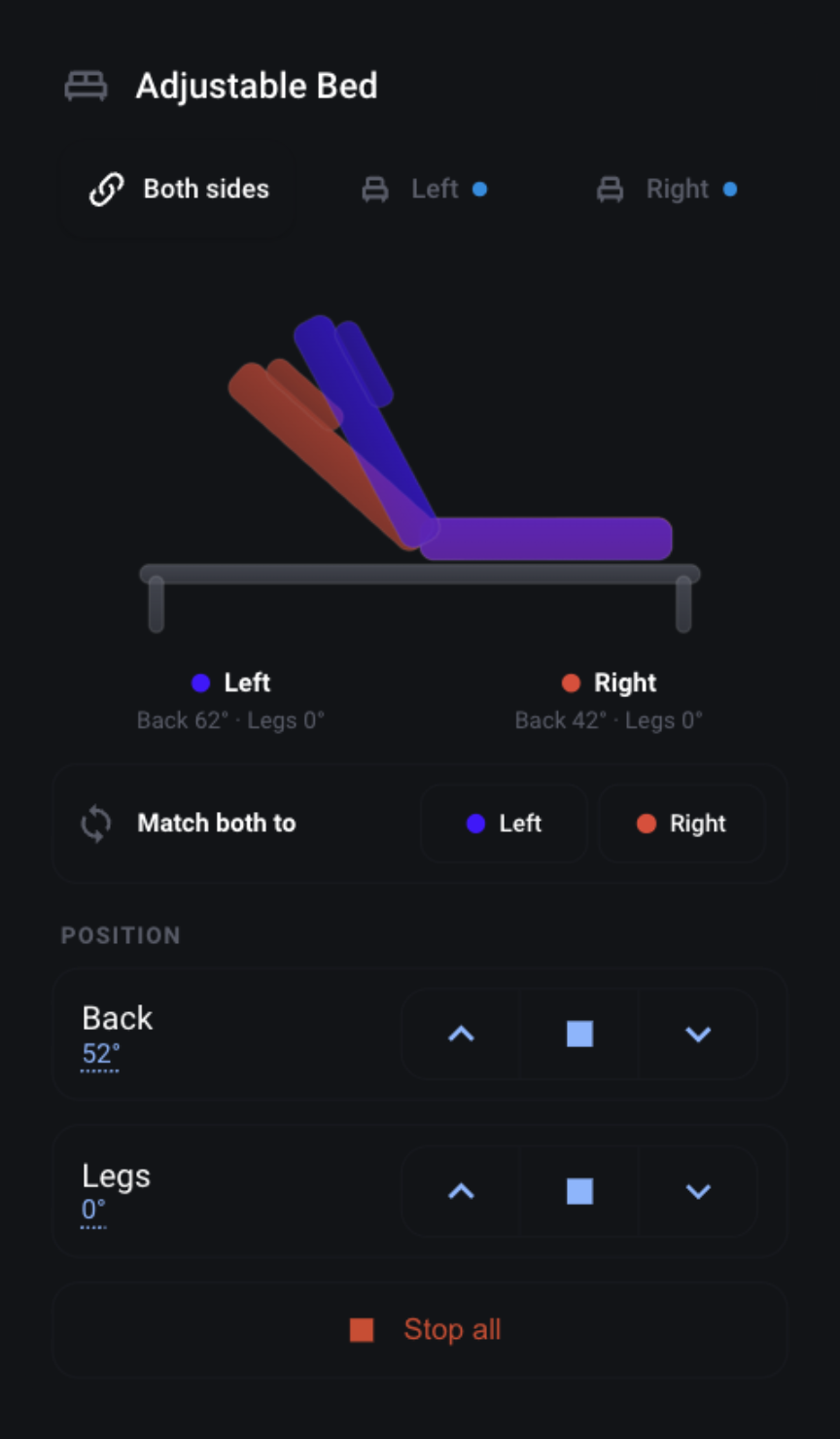
The integration ships a native Lovelace card, Adjustable Bed Card, that gives you a complete control panel for your bed — position controls, presets, memory, lighting, massage, climate, and connection — all in the Home Assistant theme. It registers and loads automatically; you do not need to add a HACS/Lovelace resource manually. If Home Assistant was open in your browser during an integration update, reload that page once after restarting Home Assistant so the browser picks up the updated card module.
If the card is missing or shows a configuration error, see the dashboard card troubleshooting guide.
To add it: edit a dashboard → Add Card → search for Adjustable Bed, then pick your bed device. Selecting one of the bed's entities first also suggests the Adjustable Bed Card. Or in YAML:
type: custom:adjustable-bed-card
device_id: <your bed device>
The card adapts to your bed — it only shows the sections your bed actually exposes (e.g. massage and climate appear only on beds that support them), so the same card works for every supported bed.
Hold an Up/Down control to repeat movement; release it to send STOP. Each repeat is a finite controller operation, so a hold can have short pauses between pulses. Position sliders appear only when the selected controller exposes them.
For a combined bed, the card offers Left / Both sides / Right. Selecting either the parent device or a side's child device opens the paired card. Both-side controls expose shared capabilities; select a side for its additional features. The Match both to controls copy the selected side's reported positions to the other side when both provide the required feedback. This is a one-time move.
See paired-bed configuration and action targeting for setup and automation behavior.
In the visual editor, choose A · Glance only, B · Quick actions, or C · Compact controls. These are starting points for the same card, and every option remains editable. Existing cards keep their full layout.
- Glance: both bed positions, with optional title and side names. Turn off the title and readouts for a graphic-only tile.
- Quick actions: the dual graphic, side selector, selected presets or memory recalls, and Stop. Choose and reorder favourites in the editor.
- Controls: adds the supported hold-to-move motor rows.
Both silhouettes remain visible when switching the action target. Hide the side selector to use a fixed target; the card labels that target when controls are shown. Native pairs store a child device ID, so renaming a side cannot reroute commands. Stop remains available with movement controls and retains targets of movement started by this card across side changes. Compact mode never saves memory positions. Preset buttons are disabled when the target exposes neither a Stop action nor motor covers that can be stopped.
Title, graphic, readouts, motor rows, lighting, and connection status are optional. Configure a local Full view path to open another dashboard view from the title or graphic. Position animation follows real degree readings, honours reduced motion, and does not loop while idle. Unknown positions show an explicit fallback; percentage feedback is shown as text rather than converted into an invented angle.
type: custom:adjustable-bed-card
device_id: <your bed device>
layout: compact
show_header: true
compact_labels: angles        # angles, names, or none
show_side_selector: true
default_target: both          # both, child device ID, or left/right for a one-address pair
compact_actions:             # ordered preset translation keys; [] for no quick actions
  - preset_flat
  - preset_memory_1
show_motors: false
show_lighting: false
show_connection: false        # compact side statuses, not connection buttons
animate: true
navigation_path: /dashboard-bedroom/bed  # optional local HA path
Omit compact_actions for Flat plus the first available memory recall (or another
preset when no memory recall exists). Only actions supported by the selected target
appear; entity names and icons are preserved. Compact controls are off by default
except for these quick actions. The other show_* sections and section_order
apply to the full layout. Memory saving and position synchronization stay there.
For frontend development, run bun run check, bun test, and bun run test:browser
from custom_components/adjustable_bed/frontend. The browser checks use synthetic
HA state and recorded service calls, and require Chromium (or CHROMIUM_PATH).
Everything is configurable from the card's visual editor (no YAML needed):
- Show/hide sections — toggle Position, Firmness, Presets, Memory, Lighting, Massage, Utility, Climate, Connection, and the bed-angle graphic on or off. Only the sections your bed has are listed.
- Reorder sections — use the up/down arrows next to each section to change the order they appear on the card.
- Choose which memory positions to show — pick exactly the memory slots you use instead of showing all of them.
Recalling and saving positions. In the Memory section, tap a position to move the bed to it. To store the bed's current position, tap Save… in the Memory header, then tap the position you want to overwrite (tap Cancel to back out). The Save button only appears for beds that support saving.
Names and icons follow your entities. The card displays each control using its entity's own name and icon, so to relabel something you just rename the entity (Settings → Devices & Services → your bed → the entity → ⚙). For example, rename Memory 1 to "Flat" and give it a bed icon, and the card's first memory tile becomes a bed icon labelled "Flat". This is purely cosmetic and local to you — the card finds entities by the integration's internal keys, so renaming or re-icon-ing never breaks it, and other users keep the tidy defaults (Memory 1–6 with numbered icons).
YAML options
type: custom:adjustable-bed-card
device_id: <your bed device>   # the bed to control (the card prompts you to pick one if omitted)
name: Bedroom Bed              # optional, overrides the card title
section_order: [motors, memory, lighting]  # optional, render order (default order otherwise)
memory_save: true              # optional, show the "Save…" button (default: true)
memory_slots: [1, 2, 3]        # optional, which memory positions to show (default: all)
# Each section defaults to shown; set to false to hide:
show_graphic: true
show_motors: true
show_firmness: true
show_presets: true
show_memory: true
show_lighting: true
show_massage: true
show_utility: true
show_climate: true
show_connection: trueWorks with Home Assistant's native Bluetooth:
- Local adapter on your HA host
- ESPHome Bluetooth Proxy for extended range
See the Connection Guide for setup help.
We'd love your help! This integration is actively developed and we're especially looking for:
- Testers - Own a bed we haven't fully tested? Your feedback is invaluable
- Bug reports - Found something wrong? Open an issue
- Code contributions - PRs welcome!
See the developer documentation for environment setup, validation, architecture, and the APK Protocol Audit workflow.
Massive thanks to the smartbed-mqtt developers for their pioneering work reverse-engineering bed protocols!
Migrating from smartbed-mqtt?
This integration replaces smartbed-mqtt with several advantages:
- Uses Home Assistant's native Bluetooth (no ESPHome API issues)
- Works seamlessly with ESPHome Bluetooth proxies
- No MQTT broker required
- Native HA entities
To migrate: Install this integration, configure your bed, verify it works, then remove smartbed-mqtt.
MIT License - see LICENSE for details.