
See how many Tavily API credits you have left without leaving OpenCode.
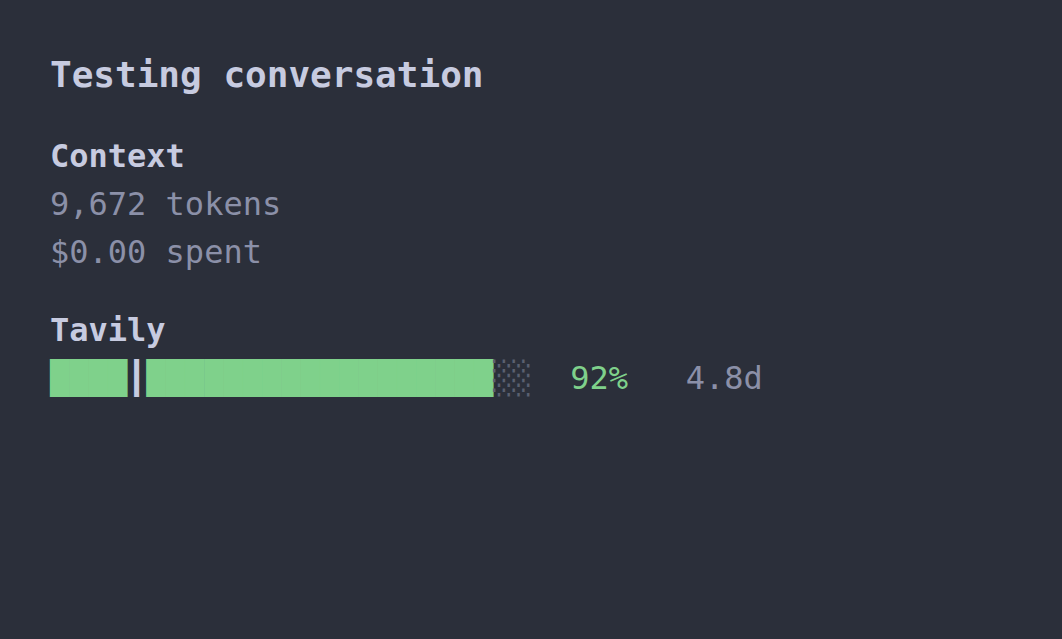
The plugin adds a Tavily section to the session sidebar with:
- a single color-coded line: progress bar, percentage remaining, and monthly reset countdown,
- an optional
┃even-use mark showing where even use would leave the quota, - a one-command refresh.
The bar ends alongside opencode-quota's bars. Compact, right-aligned
labels such as 98% 25.3d fill the measured sidebar width (currently 37 columns
with a 25-cell bar). The six-column countdown field shares opencode-quota's right edge. Shorter resets
use 23h, 4h32m, or 59m. The refresh toast keeps its more detailed countdown.
It works with the Tavily account already connected to OpenCode, so in most cases you do not need to paste a key.
- OpenCode 2.x
- A Tavily account and API key
opencode plugin add opencode-tavily-quotaRun OpenCode's Reload Configurations command after installing. If you previously copied the plugin
into ~/.config/opencode/plugins/opencode-tavily-quota/, remove that copy so it
is not loaded twice.
opencode plugin add is the recommended install: it registers both halves of the
plugin and can use OpenCode's Tavily connection. If you list the package in
cli.json instead, only the sidebar half runs and cannot reach the quota RPC.
Install both halves, and configure apiKey or TAVILY_API_KEY on the server.
The easiest way is to connect Tavily to OpenCode:
opencode auth login tavilyYou can also use /connect inside OpenCode. The active connection is read by the
OpenCode server, and the saved key is never displayed or sent to the terminal.
If you prefer a key just for this plugin, use either:
TAVILY_API_KEYin the environment that starts OpenCode, or- the
apiKeyplugin option (see Configuration).
TAVILY_API_KEY wins over apiKey. OpenCode's Tavily connection is used when
neither is set.
The sidebar refreshes every 10 minutes. To refresh immediately:
- run
/tavily-quota, or - press
Ctrl+Pand choose Refresh Tavily quota.
A manual refresh bypasses the server's fresh snapshot cache, but it still
respects a Retry-After cooldown and keeps at least 65 seconds between real
requests. A toast then shows the credits left, the percentage remaining, and the
reset countdown. Switching Tavily credentials or updating the integration
refreshes the sidebar automatically.
Quota checks share a per-key cache and request lock across sessions, locations, terminals, and separate servers using the same cache directory. Automatic reads reuse a snapshot for five minutes. Manual refresh and credential-change events cannot bypass the 65-second minimum or an active rate-limit cooldown.
Display options and refreshMs go on the terminal plugin entry in
~/.config/opencode/cli.json. Keep the plugin installed in opencode.json(c)
as well so its server RPC is available. OpenCode 2.2.5 does not forward server
plugin options to the automatically loaded TUI half; a matching CLI entry
supplies its options without rendering a second sidebar section.
{
  "$schema": "https://opencode.ai/v2/cli.json",
  "plugins": [
    {
      "package": "opencode-tavily-quota",
      "options": {
        "colors": {
          "enabled": true,
          "warningBelow": 50,
          "lowBelow": 20
        },
        "evenUse": false
      }
    }
  ]
}| Option | Default | Description |
|---|---|---|
apiKey |
unset | Server-only option in opencode.json(c). {file:...} and {env:...} are expanded by the plugin, so the raw key can stay out of the file. |
refreshMs |
600000 |
How often to refresh, in milliseconds. Values below 60000 or above the 32-bit timer maximum fall back to the default. Tavily allows 10 requests per 10 minutes, so keep this at or above 600000. |
colors.enabled |
true |
Color the bar fill and percentage green, yellow, or red. Set to false for a monochrome line. |
colors.warningBelow |
50 |
Percentage remaining below which the line turns yellow. Must be a number from 0 to 100. |
colors.lowBelow |
20 |
Percentage remaining below which the line turns red. Must be a number from 0 to 100 and no higher than warningBelow. |
evenUse |
false |
Show the ┃ even-use mark in the bar. |
If you need a plugin-specific key instead of OpenCode's saved Tavily connection,
set apiKey on the server entry in opencode.json(c), not cli.json:
{
  "$schema": "https://opencode.ai/config.json",
  "plugins": [
    {
      "package": "opencode-tavily-quota",
      "options": {
        "apiKey": "{file:~/.secrets/tavily-api-key}"
      }
    }
  ]
}
The color bands are green at or above warningBelow, yellow from lowBelow up
to but not including warningBelow, and red below lowBelow. Invalid threshold
settings fall back to the default 50/20 pair without hiding the quota.
When colors.enabled is false, the whole line uses the theme's normal muted
monochrome text; the ┃ marker stays visible through its distinct glyph.
After changing any display option, run OpenCode's Reload Configurations command. A full OpenCode restart is not required. A full configuration reload can also refresh quota through OpenCode's existing integration/refresh lifecycle; normal cache and rate-limit protections remain in effect.
{file:PATH} reads a file's trimmed contents; ~/ expands to your home
directory. {env:NAME} reads an environment variable. A missing or unreadable
file is reported in the sidebar instead of being used as the key.
| What you see | What to do |
|---|---|
no active Tavily connection |
Run opencode auth login tavily or /connect, or set TAVILY_API_KEY / apiKey. |
API key rejected (401) |
Check the key, then reconnect Tavily or update apiKey. |
rate limited on /usage |
This limit applies to quota checks, not searches. The plugin respects Retry-After (or waits ten minutes if absent/invalid), including across launches and manual refreshes. |
quota cache unavailable |
Check that the cache directory is writable. The plugin will not bypass a failed cache/lock and send uncoordinated requests. |
| A file-reference error | Check that the {file:...} path exists and is readable. |
| No Tavily section | Refresh or restart OpenCode, and confirm the plugin is installed. |
If your terminal connects to a remote OpenCode server and you want to use that server's Tavily connection, install the plugin on the server as well.
- Tavily resets credits on the first day of each month. The API does not report
the exact reset time, so the countdown assumes
00:00 UTCand may differ from your local reset by a few hours. - The
┃mark shows where even use would leave the quota at the current point in the UTC month. A mark to the right of the fill means you are using quota faster than an even pace; a mark inside the fill means you have more quota left than an even pace. - Only quota numbers are sent back to the terminal; the API key stays with the code that talks to Tavily.
- The server caches the last snapshot for up to five minutes, enforces a
65-second minimum between real requests, and remembers a
Retry-Aftercooldown, so opening several terminals or restarting the TUI does not use up the request limit. The cache is scoped to the credential, so switching Tavily accounts cannot show another account's credits. - The same cache entries are mirrored in OpenCode's plugin storage and shared
under
${XDG_CACHE_HOME:-~/.cache}/opencode-tavily-quota. Files contain quota data and a credential fingerprint, never the key. An inter-process lock and atomic writes prevent concurrent servers from spending extra requests; even an interrupted request reserves its minimum interval. Different machines or cache directories, and other applications using the same key, are not coordinated. - Tavily plan credits and pay-as-you-go credits are shown together. If the plan is exhausted, any remaining PAYG credits keep the bar above zero.
Source lives in index.ts (OpenCode server), quota-cache.ts (shared cache,
inter-process locking and rate-limit backoff), refresh.ts (TUI refresh policy),
usage.ts (Tavily client and formatting), display.ts (display settings, levels,
even-use math and line composition), and tui.tsx (sidebar and command). Tests
live in tests/. Run npm install, npm test, npm run typecheck, and
npm run build.
Tests use sandboxed cache directories and mocked HTTP, including the separate-process regressions. They do not need Tavily credentials or a browser.
MIT