
Local developer tooling for React Native Module Federation workspaces built with Re.Pack. It answers three questions in seconds, without a simulator:
- What is my federation setup? A graph of host and mini-apps: who exposes what, who consumes it, which shared versions and native modules are in play.
- Is it correct? A doctor that finds shared-version drift, singleton and eager mismatches, circular remotes, and native modules the host does not declare.
- Can I run it? An interactive dev runner that starts the whole workspace and serves a read-only Federation Studio page.
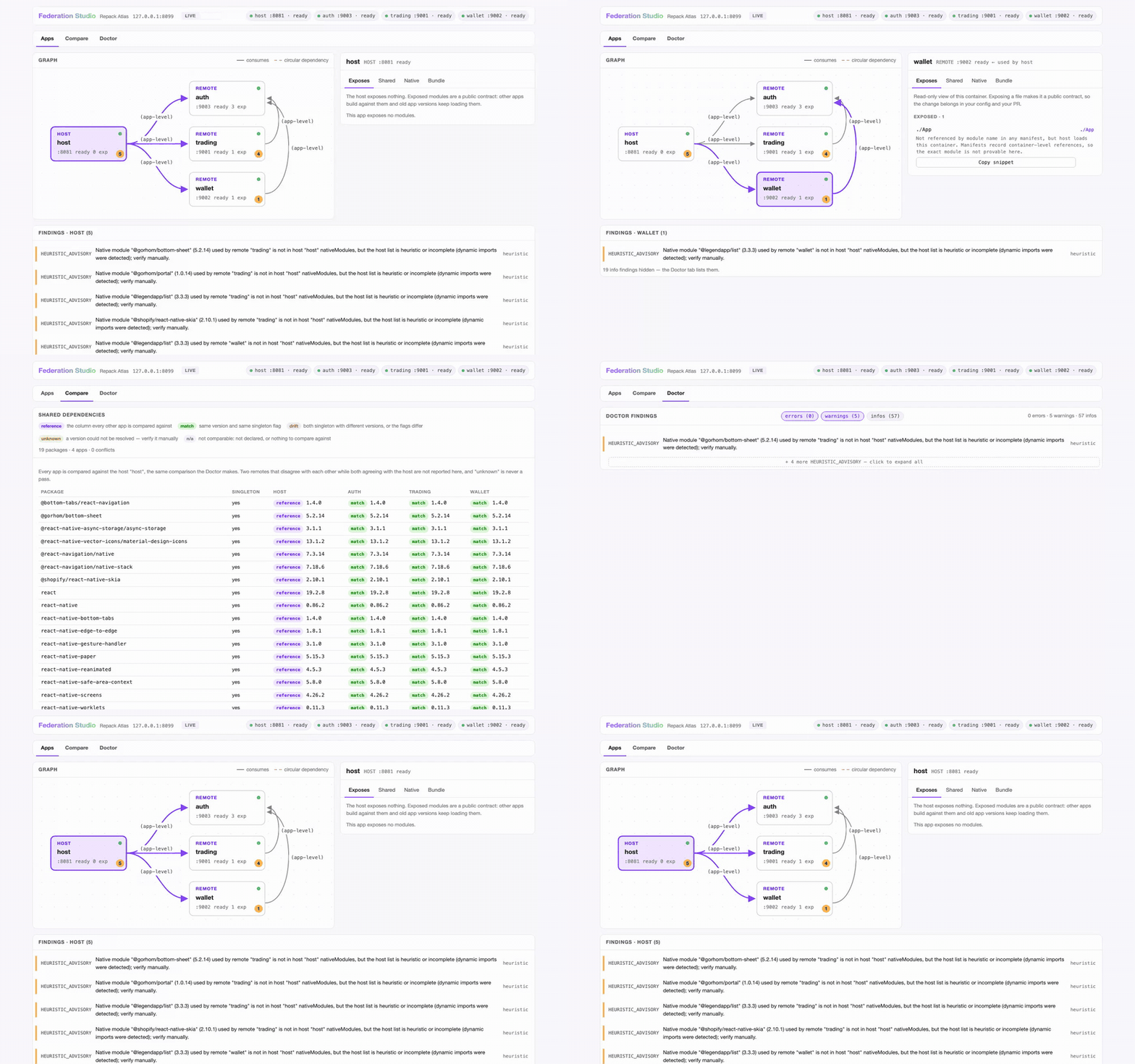
Federation Studio on a real Re.Pack workspace (host + 3 mini-apps), walking
its three tabs: Apps (the graph, an inspector per app, and the findings
that mention the selected app), Compare (every shared package × every app,
with the host as the reference column, so singleton drift is one glance away)
and Doctor (the workspace-wide findings table, severity chips and per-code
collapse; clicking a finding jumps back to the app it mentions). The
walkthrough is in
docs/demo-showcase.md.
Atlas grew out of three stacked Re.Pack PRs
(#1463,
#1466,
#1467). The Re.Pack team
concluded this is workspace tooling, not bundler scope, so it lives here; core
Re.Pack keeps only the small enabling changes. docs/PRD.md is the source of
truth for the whole design.
Atlas is on npm as @callstack/repack-atlas. Add it to the workspace you
want to check — it is a dev tool, so keep it a devDependency:
npm install -D @callstack/repack-atlas   # or: pnpm add -D @callstack/repack-atlas
npx repack-atlas --version               # or: pnpm exec repack-atlas --version
Requires Node >= 22.13. @callstack/repack is a peer dependency, resolved from
your project — Atlas never bundles it. The package ships dist/ only: the
fixture workspaces behind the demo below live in this repository, not in the
published artifact, so the demo and the contributor commands need a clone.
Requirements: Node >= 22.13, pnpm >= 10 (packageManager pins the exact version).
git clone <this repo> && cd repack-atlas
pnpm install
pnpm build
pnpm test        # 274 tests, fixtures only, a few seconds
The repo ships throwaway fixture workspaces under fixtures/, so you can see
the doctor and the runner with zero setup. The commands below were run from a
fresh clone; the output is real.
Doctor on a workspace with a deliberate singleton version conflict:
$ node dist/cli.js doctor --workspace fixtures/fixture-version-drift; echo $?
host:   host  .../fixtures/fixture-version-drift/manifests/host.json
remote: mini_auth  .../fixtures/fixture-version-drift/manifests/mini-auth.json
remote: mini_store  .../fixtures/fixture-version-drift/manifests/mini-store.json

errors (1):
  SHARED_VERSION_DRIFT [static] Singleton shared dependency "react" resolves to
  different versions: host "host" has 19.0.0, remote "mini_store" has 19.1.0.
  Align the versions (or remove singleton).

summary: 1 error, 0 warnings, 0 info
1
Doctor on a workspace that only trips findings by convention (host eager, remotes lazy — an info finding, not a problem):
$ node dist/cli.js doctor --workspace fixtures/fixture-eager-advisory; echo "EXIT=$?"
host:   host  .../fixtures/fixture-eager-advisory/manifests/host.json
remote: mini_auth  .../fixtures/fixture-eager-advisory/manifests/mini-auth.json
remote: mini_store  .../fixtures/fixture-eager-advisory/manifests/mini-store.json

infos (4 hidden — --show-infos or --code CODE to list):
  EAGER_ADVISORY [static] × 4

summary: 0 errors, 0 warnings, 4 info
EXIT=0
The human output keeps signal high: info findings are hidden by default (list
them with --show-infos, or any single code with repeatable --code <CODE>),
and repeated codes collapse to a first line plus a + N more pointer. Exit
codes always come from the full report, and --json always reports every
finding regardless of these flags.
Exit codes are a contract: 0 clean (warnings allowed), 1 ran and found
errors, 2 could not answer. The clean fixture exits 0. A remote manifest
that exists but cannot be read is a named MANIFEST_UNREADABLE error (exit 1,
the other remotes are still checked); exit 2 is for runs with nothing to
compare: no or invalid config, an unreadable host manifest, or every remote
manifest exists but is unreadable. Missing remote manifests keep exit 1
(0 with --allow-missing-manifests). When remotes exist but none of them
could be compared (all missing, or missing plus unreadable), doctor adds a
NOTHING_COMPARED warning so a clean exit is not read as "the federation was
checked"; like any warning it only affects the exit code under
--fail-on-warnings.
repack-atlas dev starts every app in a workspace, serves the Studio page and,
if you ask, launches the app on a device. On a terminal it opens a wizard:
repack-atlas devThe wizard asks which remotes to run (all are preselected; deselect them all,
or type none in the readline fallback, for a host-only session, the same as
--apps host), the platform (iOS, Android or all),
whether to launch the app (one platform only), a port for each app and, for
remotes that declare standalone: true, whether to run one standalone. Ctrl-C
at any question exits 0 with nothing started.
The same session with flags, which is also what runs in CI and pipes (no wizard without a TTY):
repack-atlas dev --apps host,mini_auth --platform ios --no-interactive
repack-atlas dev --platform ios --launch --device "iPhone 16"   # put the app on the device
repack-atlas dev --dry-run --platform android                   # print the plan, spawn nothing
Real output on the fixture workspace (stub bundlers that serve checked-in manifests, which is why it takes seconds):
$ node dist/cli.js dev --workspace fixtures/workspace --ci --studio-port 0
Federation Studio (read-only): http://127.0.0.1:62053/
dev: supervising 3 app(s) (host:8081 mini_auth:8082 mini_store:8083)
dev: host → starting (port 8081)
[host] ready
dev: mini_auth → starting (port 8082)
[mini_auth] ready
dev: mini_store → starting (port 8083)
[mini_store] ready
dev: host → ready (port 8081)
dev: mini_auth → ready (port 8082)
dev: mini_store → ready (port 8083)
Open the printed URL. The Studio page is read-only forever (manifest content is
rendered as text, the server binds 127.0.0.1 only, there is nothing to write)
and has three tabs: Apps (graph + inspector + the selected app's findings),
Compare (the shared-dependency matrix — each app against the host, the same
comparison the doctor makes) and Doctor (the workspace-wide findings
table). Without --ci a terminal also gets key handling (press
v to open the Studio, q to quit).
| Flag | Effect |
|---|---|
--apps <list> |
Config keys to run (host, remote names). Skips the wizard. |
--platform ios|android |
Platform for the session. |
--port <n> / --auto-ports |
Host port (default 8081); move busy ports to free ones instead of failing. |
--standalone <remote> |
Run a remote declared standalone: true on its own. |
--launch / --no-launch / --device <id> |
Launch the app once the target is ready (needs --platform). |
--no-interactive / --ci |
Never prompt (--ci also disables key handling). |
--dry-run / --json |
Print the plan and exit / one JSON event per line. |
--no-studio / --studio-port <n> |
Skip the Studio or pick its port. |
Exit codes: 0 clean (also a wizard cancel), 1 a port conflict or an app
that errored, 2 could not answer (bad flags, unknown app, missing
react-native). The host defaults to 8081; if it is busy the run exits 1
unless you pass --auto-ports. repack-atlas dev --help has every detail and
docs/PRD.md §7.1.1 the full contract.
What each app runs is decided per app in repack-federation.json:
root: the app directory. By default Atlas runs the app's ownnode_modules/.bin/react-nativeshim (node <react-native CLI>when there is no shim) withstart [--bundler <rspack|webpack>] --port <n>from there, soreact-nativemust be installed in each app root. One app without it fails the whole run (exit2).--bundlerand--standaloneare passed only when the app's installedstartcommand declares them (read from itsreact-native.config.js): published Re.Pack 5.x has neither, since its config picks the bundler, while builds with callstack/repack PR #1467 have both.--standaloneon a start without it exits2naming the app.config: the bundler config file, relative to the config directory. Without it the bundler is detected fromrspack.config.*/webpack.config.*.port: the declared port. A remote without one gets a free port.standalone:truelets--standalone <remote>run it alone.command: an explicit override, run verbatim through a shell from the config directory. It gets the platform and standalone choice only asATLAS_APP_PLATFORMandATLAS_APP_STANDALONE. The fixtures use it for their stub bundlers.
init no longer writes command: it writes root and the default argv does
the rest.
Atlas reads repack-federation.json plus one federation manifest per app. To
point it at a real project, add two plugins to each app's rspack config:
@callstack/repack-atlas/plugin (emits the manifest) and
@callstack/repack-atlas/introspection
(feeds init and the workspace config). Both are opt-in. Both subpaths are
Atlas public API (semver applies once published), and Re.Pack / Module
Federation compatibility is validated by Atlas, not upstream; see PRD §8.2.
Then:
npx repack-atlas init --workspace /path/to/workspace   # discovers apps, writes root and port
npx repack-atlas doctor --workspace /path/to/workspace
Two optional repack-federation.json fields are easy to misread:
root(host and remotes): only the dev runner uses it. It is resolved against the config directory, handed to the app process asATLAS_APP_ROOT, and is where the defaultreact-native startruns. Doctor, graph and Studio resolvemanifestrelative to the config directory and ignoreroot.remotes.<name>.standalone: a flag you declare ("this remote can run without the host"). Doctor and the Studio only check it is a boolean (the Studio shows a read-onlystandalonebadge whentrue); the dev runner uses it to allow--standalone <remote>and the wizard's standalone question.
From npm, as above — npm install -D @callstack/repack-atlas. The binary is
repack-atlas and the two plugin subpaths are imported from the same package,
so an npm install is all a project needs.
Do not install from a git URL: dist/ is gitignored, so a git install gets
sources only and the repack-atlas binary is missing.
Building from a clone is for working on Atlas itself. To try an unreleased
commit from a project, link that clone (an absolute path;
pnpm link --global is not valid on pnpm 11) and rebuild it after each change:
git clone https://github.com/callstackincubator/repack-atlas.git
cd repack-atlas && pnpm install && pnpm build

# In the project that should get the `repack-atlas` binary:
pnpm link /absolute/path/to/repack-atlas
In the app you want to instrument, add the two Atlas plugins (see
docs/demo-showcase.md);
they resolve @callstack/repack from that app, not from Atlas.
docs/decisions/npm-publish.md
tracks the publish decision and the release runbook.
Each fixture variant provokes exactly one finding; pnpm test asserts every
row. Expectations also live in fixtures/README.md.
| Variant | Finding | Exit |
|---|---|---|
workspace/ |
none (clean) | 0 |
fixture-remote-cycle/ |
REMOTE_CYCLE (warning) |
0 |
fixture-version-drift/ |
SHARED_VERSION_DRIFT |
1 |
fixture-missing-native/ |
MISSING_NATIVE_MODULE |
1 |
fixture-corrupt-manifest/ |
MANIFEST_UNREADABLE (names the app) |
1 |
fixture-heuristic-downgrade/ |
HEURISTIC_ADVISORY (warning) |
0 |
fixture-eager-advisory/ |
EAGER_ADVISORY (info — host-eager/remote-lazy is the MF convention) |
0 |
fixture-missing-remote-manifest/ |
MISSING_REMOTE_MANIFEST |
1 (0 with --allow-missing-manifests) |
fixture-nothing-compared/ |
NOTHING_COMPARED (warning) plus a MISSING_REMOTE_MANIFEST per remote |
1 (0 with --allow-missing-manifests) |
fixture-xss/ |
hostile strings render as text in Studio | 0 |
This repo is set up to be worked on by any coding agent: Claude Code, Codex,
Apex/OpenCode, Cursor, VS Code. AGENTS.md is the single source of truth;
canonical skills live in .agents/skills/ (agentskills.io format), and
pnpm agent:sync generates the .claude/skills/ symlinks plus the AGENTS.md
tables. CI runs pnpm agent:check and fails on drift. Add a skill by dropping
a folder with a SKILL.md and running the sync; see CONTRIBUTING.md.
pnpm lint          # ESLint incl. bridge-fence and core-boundary rules
pnpm typecheck     # tsc --noEmit over src + tests
pnpm build         # src -> dist
pnpm test          # node:test via tsx
pnpm agent:check   # agent files sync drift (exit 1 on drift)
pnpm check:vendored  # every vendored file is in VENDORED.md w/ a commit sha
pnpm test:e2e      # Playwright over the Studio preview (needs:
# pnpm exec playwright install chromium)src/repack-bridge/vendored/ contains code copied from
callstack/repack (branch feat/federation-manifest, commit c5df67f0)
under the MIT license, with per-file copyright headers. Re.Pack will not merge
that branch, so the code is an Atlas-owned fork and a supported part of Atlas.
VENDORED.md is the provenance ledger: every file, its upstream path and source
commit. CI enforces the ledger (pnpm check:vendored).
MIT. See LICENSE. Vendored files retain their upstream MIT copyright headers.