
A comprehensive, client-side rendering engine designed to parse, calculate, and visualize Android XML layouts within a web-based environment. This system replicates key portions of the Android UI framework, including the complex measurement and layout passes required for ConstraintLayout and MotionLayout.
This plugin based on XHLP 1.0 that's Android Xml previewer & All features of Android Builder is Available in this plugin with more customization.
✅ Future Target Edit XML from UI
✅ Installation After installation , go to setting of this plugin and export plugin.zip after exporting install in Fdroid version of Acode (For Apk/Abb) build purpuse
✅ XHLP Engine : This doesn't require any setup , go to direct android folder search for .xml (eg: activity_main.xml) and preview
❌ Uninstall Uninstall Android Builder plugin Before installing this plugin
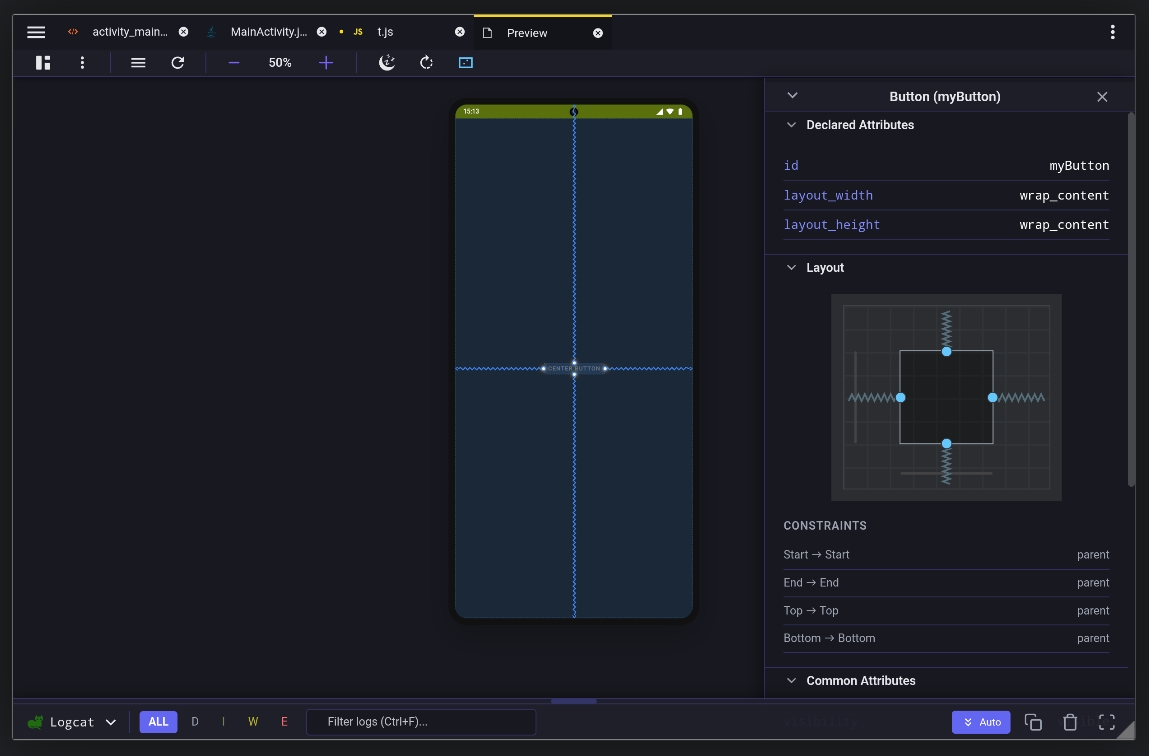
XHLP 1.0 EngineLive Android Xml preview- Enhanced
Android Builderand it's features with customization
- Open Android Project
- Choose xml file like
activity_main.xml - Click on Top Icon
- After once preview just switch Xml file -> Preview Tab insted of clicking icon
⚠️ Again repeating : Once you open preview don't close that tab [switch .xml & then open preview tab] , if you close then you have to restart Acode for load engine again Otherwise some features may not work properly
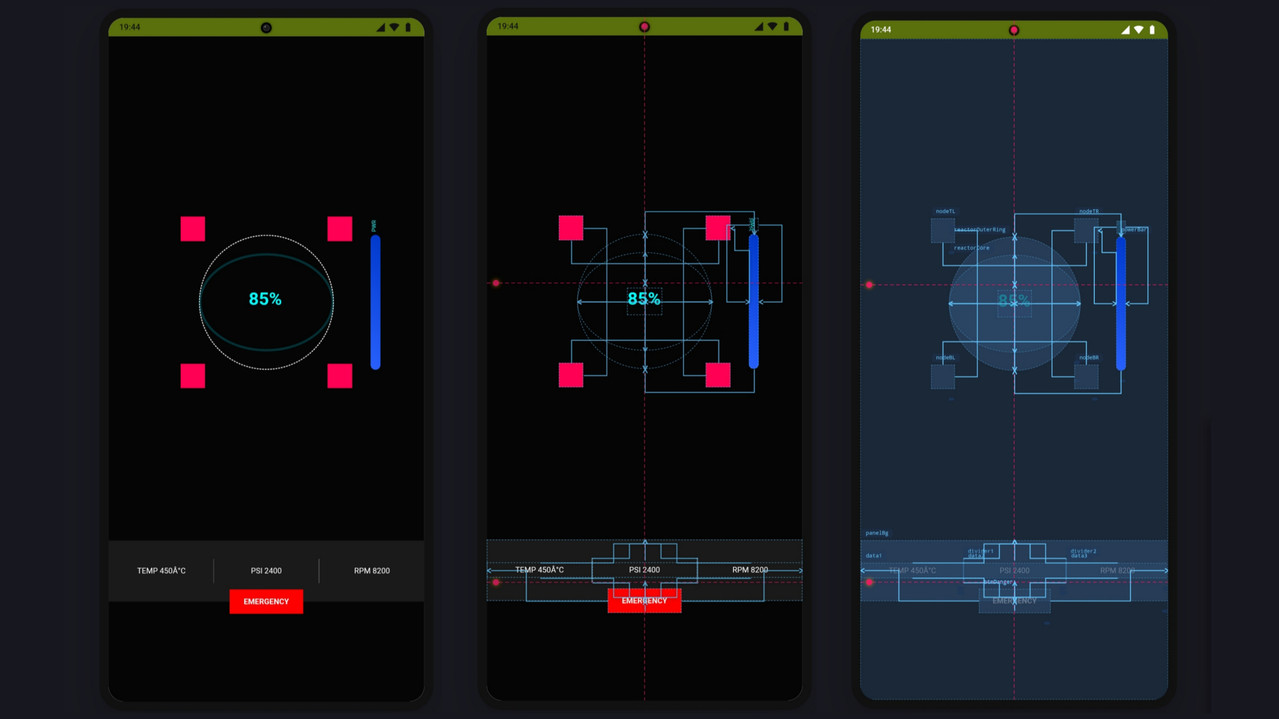
This engine operates by parsing raw Android XML resources and converting them into a DOM structure styled dynamically via JavaScript. It features a custom-built constraint solver, a resource resolution system for handling Android-specific references, and a dual-mode rendering pipeline (Design and Blueprint).

-
XML Parsing & DOM Construction: Converts Android XML hierarchies into web-compatible DOM elements while maintaining attribute integrity.
-
Resource Resolution: Resolves Android resource references including
@string,@color,@dimen, and@style. It supports basic theme attribute resolution (?attr). -
Drawable Rendering: Support for complex Android drawables, including:
-
VectorDrawable(XML to SVG conversion) -
ShapeDrawable(Gradients, corners, strokes) -
StateListDrawable(Selector logic) -
Density Conversion: Automatic pixel-to-dp conversion based on configurable device density buckets (mdpi, hdpi, xhdpi, etc.).
The engine implements distinct logic for measuring and positioning views based on their parent layout type:
-
ConstraintLayout System: A fully implemented algebraic solver that supports:
-
Relative positioning (Start/End, Top/Bottom).
-
Chains (Spread, Packed, Spread Inside).
-
Guidelines (Vertical/Horizontal, Percent/Dimension).
-
Barriers (Dynamic referencing).
-
Bias settings and Dimension ratios.
-
Circular positioning.
-
Linear & Relative Systems: Logic for
weightdistribution in linear containers and dependency graph resolution for relative positioning. -
MotionLayout Support: Parses
MotionScenefiles to handle state transitions and constraint sets, enabling animation previews.
The engine includes a library of renderers for standard Android UI components, ensuring accurate visual representation of attributes:
- Basic Inputs & Controls: Full support for
TextView,Button,EditText,CheckBox,Switch,SeekBar, andProgressBar. - Media & Graphics: Rendering logic for
ImageView(supporting various scale types) andShapeDrawablebackgrounds. - Complex Containers: Implementation of
ScrollView,HorizontalScrollView,CardView, andNavigationView. - Collections: Visual placeholders for
RecyclerViewto assist in list layout design. - Constraint Helpers: Functional implementation of non-visual helper widgets including
Group,Flow,Layer, andPlaceholder.
- Blueprint Mode: A technical view mode that visualizes the relationship between views. It renders constraint connections, spring/zigzag lines for loose connections, anchor points, and chain linkages using a dedicated SVG overlay layer.
- Attribute Inspector: A sidebar interface for inspecting selected view properties, layout parameters, and active constraints.
- Constraint Widget: A visual representation of margins, bias, and view dimensions (
wrap_content,match_parent,0dp) for the selected element. - Logcat UI: An integrated logging interface to display parsing errors, missing resources, and system warnings.
The project is structured into modular components to ensure separation of concerns:
- Solvers: Contains the mathematical logic for calculating view positions. This includes specialized calculators for flow, chains, and dimension estimation.
- Parsers: Responsible for reading raw XML content (Manifests, Layouts, Styles, Motion Scenes) and converting them into usable JavaScript objects.
- Renderers: Handles the drawing logic. This is split into core view rendering and blueprint/overlay rendering.
- Resolvers: Manages the linking of resources and attributes to the views.
- UI Controls: Manages the toolbar, zoom controls, device frame simulation, and user interaction events.
Pass Rate: 95%+
Tested against 300+ complex Android XML layouts, including deeply nested ConstraintLayouts, RTL/LTR combinations, barriers, chains, flows, and edge-case constraint interactions.
Accuracy: 90% – 95% overall Accuracy is measured by comparing computed view geometry
Remember This Engine not Always correct but maximum time perfect preview
Other tests waiting for you ❤️
The following metrics represent the current implementation maturity of specific Android components within this engine.
| ConstraintLayout |
|
92% |
| LinearLayout |
|
95% |
| RelativeLayout |
|
85% |
| MotionLayout |
|
65% |
| Vector Drawables |
|
80% |
| Resource Resolution |
|
75% |
| Standard Widgets |
|
88% |
DATA NOT AVAILABLE
At the moment, this plugin is not available as a free version or testing version
Feedback ? Feedback here
Bugs ? Comment bugs
Telegram: Dev. Sou
acode.plugin.androidbuilder