



This script generates a fixed CPU load for a finite or indefinite time period, on one or more CPU cores. A PI controller is used for this purpose.
You provide the desired CPU load and the CPU core(s) to load. The controller and the CPU monitor run in separate threads.
Supported platforms: Linux, macOS, and Windows (Windows is less tested; psutil supports CPU affinity on all three).
- Project homepage: https://gaetanocarlucci.github.io/CPULoadGenerator/ — more details on the tool.
- Blog: Theoretical explanation of this tool.
- Python 3.9+ (tested with 3.13)
Create and activate a virtual environment, then install dependencies:
cd CPULoadGenerator/
python3 -m venv venv
source venv/bin/activate
pip install -r requirements.txt
Run the script (e.g. 20% load on core 0 for 10 seconds):
python cpu_load_generator.py -l 0.2 -d 10 -c 0Or make the script executable and run: chmod +x cpu_load_generator.py then ./cpu_load_generator.py -l 0.2 -d 10 -c 0.
System-wide install (Debian/Ubuntu): sudo apt install python3-matplotlib python3-psutil python3-click
Platform notes: On macOS, CPU affinity is not supported, so the load may be distributed across cores. Use exactly one core with --plot for the live plot window and PNG (e.g. -c 0 -l 0.5 -d 20 --plot); with multiple cores, --plot is ignored.
Run from Docker Hub:
docker run --rm gaetano/cpuloadgen -c 0 -l 0.2 -d 10Build locally: docker build -t cpuloadgen .
-
20% load on core 0 for 20 seconds:
./cpu_load_generator.py -l 0.2 -d 20 -c 0
-
65% load on cores 0, 1 and 5, until interrupted (Ctrl-C):
./cpu_load_generator.py -l 0.65 -c 0 -c 1 -c 5
-
55% load on core 0, 12% on core 3, until interrupted:
./cpu_load_generator.py -c 0 -c 3 -l 0.55 -l 0.12
-
12% load on cores 0 and 1 for 20.5 seconds, then plot the load:
./cpu_load_generator.py -l 0.12 -c 0 -c 1 -d 20.5 --plot
-
Example graph of CPU load (50% target on core 0):
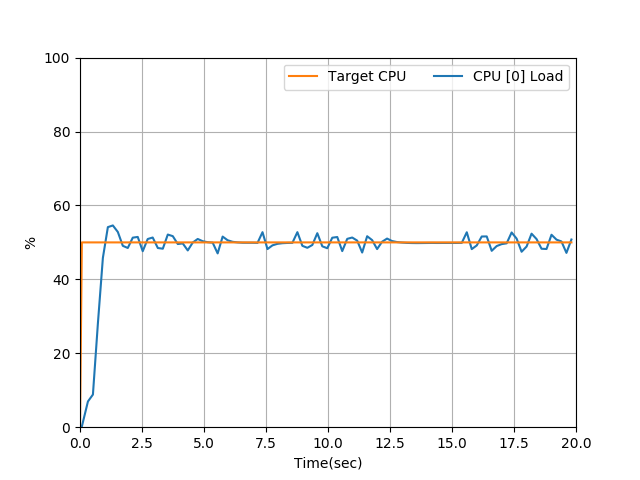
Test and identification scripts live in tests/ (see tests/README.md). Expected output from the PID script after CPU identification:
