Hello, I'm new to processing and also new to programming. I just know a bit of C++ and python.
I was trying to convert a java base code in processing to python so that I can work on it better but there was something that takes my attention.
I write a same code in java and python in processing but their output is not the same in visual.
python version is a little bigger and also less accurate in drawing things like circles and lines.
I put an example here for you to see what is my mean.
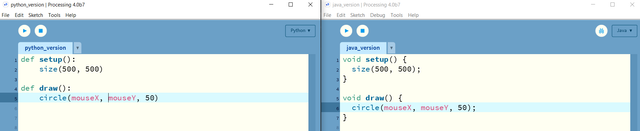
this is the code:
python:
def setup():
size(500, 500)
def draw():
circle(mouseX, mouseY, 50)
java:
void setup() {
size(500, 500);
}
void draw() {
circle(mouseX, mouseY, 50);
}
and this is the outputs:
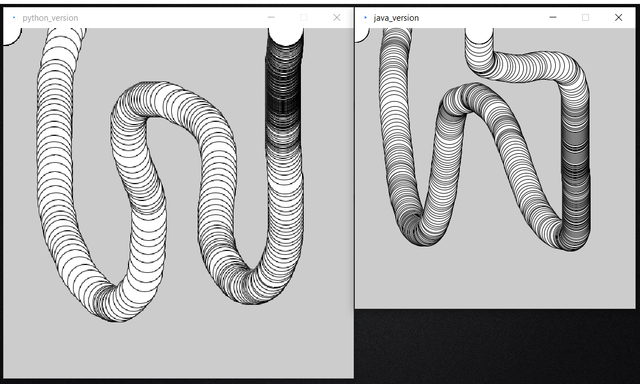
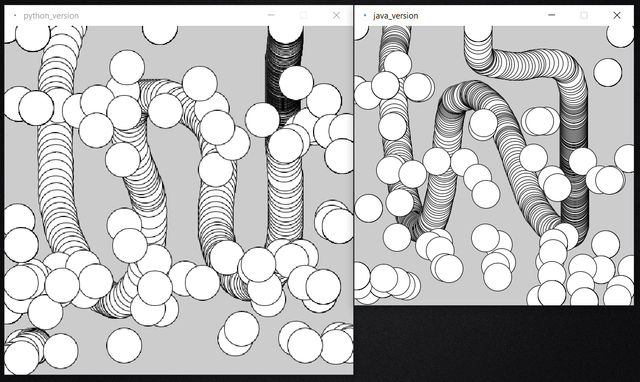
Am I doing something wrong or is kind of normal that the python version is like this?
I also see that the python version doesn't have debugging mode and the auto-formatting doesn't work on python.
Hello, I'm new to processing and also new to programming. I just know a bit of C++ and python.
I was trying to convert a java base code in processing to python so that I can work on it better but there was something that takes my attention.
I write a same code in java and python in processing but their output is not the same in visual.
python version is a little bigger and also less accurate in drawing things like circles and lines.
I put an example here for you to see what is my mean.
this is the code:
python:
def setup():size(500, 500)def draw():circle(mouseX, mouseY, 50)java:
void setup() {size(500, 500);}void draw() {circle(mouseX, mouseY, 50);}and this is the outputs:
Am I doing something wrong or is kind of normal that the python version is like this?
I also see that the python version doesn't have debugging mode and the auto-formatting doesn't work on python.