- my python code examples, ready parts
- python3 readiness
- list of frameworks
- terminal gui - tui
import os

proxy = 'http://<user>:<pass>@<proxy>:<port>'
os.environ['http_proxy'] = proxy
os.environ['HTTP_PROXY'] = proxy
os.environ['https_proxy'] = proxy
os.environ['HTTPS_PROXY'] = proxy| Framework | Purpose | URL | Notes |
|---|---|---|---|
| uv | Fast Python package installer & project manager | https://docs.astral.sh/uv/ | Modern, Rust-based, replaces pip/venv/poetry |
| Poetry | Dependency management & packaging | https://python-poetry.org/ | Declarative pyproject.toml, lock files, virtual envs |
| pip | Package installer | https://pip.pypa.io/ | Standard Python package manager |
| pipenv | Dependency management & virtual environments | https://pipenv.pypa.io/ | Combines pip + virtualenv, uses Pipfile |
| conda | Package & environment manager | https://docs.conda.io/ | Handles non-Python dependencies, anaconda/miniconda |
| hatch | Modern Python project manager | https://hatch.pypa.io/ | Project scaffolding, virtual envs, build/publish |
| pdm | PEP 582 compliant dependency manager | https://pdm-project.org/ | No virtual env needed, local packages |
| setuptools | Build & distribution tool | https://setuptools.pypa.io/ | Legacy, used for building packages |
| flit | Simple Python packaging | https://flit.pypa.io/ | Minimal configuration, focuses on simplicity |
| pex | Python EXecutable creator | https://docs.pex-tool.org/ | Creates executable Python packages |
| rye | Python version & project manager | https://rye.astral.sh/ | All-in-one tool, from Astral (uv creators) |
curl -LsSf https://astral.sh/uv/install.sh | sh
uv --version
uvx run applications
uvx ruff check .
uvx black .
uvx httpie https://example.com
uvx cookiecutter https://github.com/example/templateuv init my-project
cd my-project
### the same
mkdir my-project
cd my-project
uv init
### to run the project
uv run main.pymy-project/
├── pyproject.toml
├── README.md
└── main.py
uv init --python 3.12 my-project
uv init --python 3.12uv init --lib my-libraryThis typically creates a package layout:
my-library/
├── pyproject.toml
├── README.md
└── src/
    └── my_library/
        └── __init__.py
uv init --package my-appuv init --help
uv init --bare # Create only the minimal project files
uv init --no-readme # Do not create README.md
uv init --python 3.11 # Select the Python version
uv init --lib # Initialize a library
uv init --package # Create a packaged applicationAfter initialization, add dependencies with:
uv add requests
uv add fastapi
Run Python commands inside the project environment with:
uv run python
uv run main.py%PYTHON%/Scripts/easy_install.exe <package name>from setuptools.command import easy_install
# install package
easy_install.main( ["termcolor"] )
# update package
easy_install.main( ["-U","termcolor"] )- isolation
- dependency resolver
- good cli
poetry new my_own_project
poetry add selenium
poetry show --tree

poetry run my_script_namepip search {search key}
pip install pip-search
python -m pip_search "your-query-search"
pip install pypisearch
pypisearch "your query"curl https://bootstrap.pypa.io/get-pip.py -o get-pip.py
python get-pip.pyissue:
ImportError: cannot import name 'sysconfig'
solution
# pip install
# sudo apt install python3-distutils
sudo apt install python3-pippip3 install --upgrade pip
pip install -U pipdebian
apt-get install -y --no-install-recommends python3-pipNEXUS_HOST=some.host.com
python3 -m pip config --user set global.index-url https://${NEXUS_USER}:${NEXUS_PASS}@${NEXUS_HOST}
python3 -m pip config --user set global.trusted-host ${NEXUS_HOST}sudo pip install selenium
sudo pip install xvfbwrapper
sudo pip install pyvirtualdisplay
sudo apt-get install xvfb
wget https://github.com/mozilla/geckodriver/releases/download/v0.21.0/geckodriver-v0.21.0-linux64.tar.gz
chmod +x geckodriver
sudo cp geckodriver /usr/local/bin/
pip install --proxy=http://proxy.muc:8080pip install --index-url http://cc-artifactory.mynetwork.net my_own_packagepip install --user .pip3 install --user ~/Downloads/PyGUI-2.5.4.tar.gzPACKAGE_NAME=electrum
sudo -H pip3 install https://download.electrum.org/4.1.2/Electrum-4.1.2.tar.gz#egg=${PACKAGE_NAME}[fast]pip install torch torchvision torchaudio --index-url https://download.pytorch.org/whl/cu121pip install git+https://github.com/django-extensions/django-extensions
pip install git+https://github.com/django-extensions/django-extensions.git
pip install -e git+https://github.com/django-extensions/django-extensions.git#egg=django-extensions
pip install https://github.com/django/django/archive/stable/1.7.x.zip
pip install git+ssh://git@github.com/myuser/foo.git@my_version
pip install --target=/home/user/my/python/packages package_name
export PYTHONPATH=$PYTHONPATH:"/home/ubuntu/.local/lib/python3.8/site-packages/gunicorn"
python setup.py installpython setup.py install --record list_of_files.txt
cat list_of_files.txt | xargs sudo rm -rfpip listpip freezeimport sys
sys.modulesmapr.ojai.storage.__path__
dir(mapr.ojai.storage)# path to folder with all packages
import sys
print(sys.prefix)for easy_install, pip
import site
print(site.getsitepackages())import pip
pip.__version__
pip.main(["install", "wheels"])
#pip.main("install", "wheels")fix for version 9 and 10
error message: AttributeError: 'module' object has no attribute 'main'
solution:
try:
    from pip import main as pipmain
except:
    from pip._internal import main as pipmain
pipmain(["install", "wheels"]);
cat /etc/pip.conf [global]
index-url = https://cc-artifactory.myserver.net/artifactory/api/pypi/adp-pypi-virtual/simplepip install tornado==2.1.1
pip install -r requirements.txt
# sometimes after installation not working
# 'pip list' & 'pip freeze' are not consistent
cat requirements.txt | xargs -I {} ./pip3 install {}
where requirements.txt is:
-r requirements-base.txt
docker==3.7.0
enum34==1.1.6
flask-restful==0.3.7
pip install tornado --update

# pip update pip
python3 -m pip install --upgrade pip
sudo apt install --upgrade python3-pippip uninstall {package name}pip install pipdeptree
pipdeptreefor transitive dependency:
- constraints.txt file should be considered
pip install -c constraints.txt - poetry ( under the hood uses pip )
### Install build dependencies
sudo apt update
sudo apt install -y build-essential curl git \
  libssl-dev zlib1g-dev libbz2-dev libreadline-dev \
  libsqlite3-dev libffi-dev liblzma-dev tk-dev \
  python3-openssl

### Install pyenv
curl https://pyenv.run | bash

### extend bash
cat <<'EOF' >> ~/.bashrc
export PYENV_ROOT="$HOME/.pyenv"
export PATH="$PYENV_ROOT/bin:$PATH"
eval "$(pyenv init - bash)"
EOF
source ~/.bashrc

### check installation
pyenv doctor

### Install versions
pyenv install 3.10.14
pyenv install 3.12.4
pyenv versions

### Switch versions
pyenv global 3.12.4      # default for all shells
pyenv local 3.10.14       # per-folder (creates .python-version)
pyenv shell 3.12.4        # for current shell only

### Virtual environments
pyenv virtualenvs               # list of environments
pyenv virtualenv ai-tools       # create virtual env: $HOME/.pyenv/versions/ai-tools/
eval $(pyenv virtualenv-init ai-tools)  # activate virtual env

pyenv activate ai-tools
pyenv virtualenv-prefix pipx creates an isolated environment for each application and its associated packages
pip install pipenvpip install virtualenv
apt install python3-env
sudo apt install python3-virtualenv## create
# pyenv virtualenv 3.9.12 dev
# pyenv local dev
# python3 -m virtualenv venv
virtualenv venv
# activate
source venv/bin/activate
# commands will be executed into virtual env
pip install wheel
python3
# check virtual env
echo $VIRTUAL_ENV
# exit from virtual environment
deactivateimport sys
sys.path.append("/path/to/your/my_extra_component")
import extra_component
target = __import__("data-migration")
try:
    import json
except ImportError:
    import simplejson as json
when you execute your own project locally
ModuleNotFoundError: No module named 'list_comparator'
echo $PYTHONPATH
export PYTHONPATH=$PYTHONPATH:"/home/projects/wondersign/integration-prototype"

/home/projects/integration-prototype/list-comparator/venv/bin/python /home/projects/integration-prototype/list-comparator/list_comparator/data_api/tools/data_api_reader.pypex --python=python3 flask requests tornado -o samplepkg.pexpyinstaller --onefile app.pyimport sys
sys.executable
also check
sys.modules
python -c "import base64;print(base64.encodestring('hello'.encode()));"
# execute cmd inline with arguments -c with args, string url encode
python -c 'import urllib.parse;import sys;print(urllib.parse.quote(sys.argv[1]))' "Hallo Björn@Python"
a=10
eval(" print(a)")
find - return -1 if not found
index - throw exception if not found
python -m site --user-site
help contextlib
pydoc contextlib
__call__ <class instance>()
mkdir ./my_folder
touch ./my_folder/__main__.py
python3 ./my_folder
	rpm -ba --define _topdir ...
	-ba: unknown option
	error: command 'rpm' failed with exit status 1
need to execute: yum install rpm-build
# BUILD PEX
PANTS_PATH="../../../.."
PANTS_OUTPUT=$CURRENT_PATH/dist
$PANTS_PATH/pants --pants-distdir=$PANTS_OUTPUT binary src/path/to/package:package-name
            "justMyCode": false,
            "args": [
                "--url=spaceMin",
                "--output_file=/tmp/immo_mering.html"
             ]
(debug with cli)[https://docs.python.org/3/library/pdb.html]
import pdb
# ...
pdb.set_trace()
# breakpoint()
for ipdb:
# python3 -m pip install --user ipdb
__import__('ipdb').set_trace(context=21)
execute python app in debug
python3 -m pdb myscript.py
python3 -m pdb myscript.pex arg1 arg2
pdb myscript.py
debug commands
b my_python_file.py:65
cont
step
next
p x+y
until 99999
continues
return
tox.ini
commands = pex . -c download_symbolic_link_creation.py --disable-cache -i {env:PIP_INDEX_URL} -r requirements.txt -o {env:PEX_OUTPUT_PATH} --python-shebang="/usr/bin/env python3.8"
setup.py
from setuptools import setup

setup(
    name='download_python_app',
    version='0.0.1',
    scripts=['download_python_app/download_symbolic_link_creation.py']
)pip install pypy
pypy app.py
# or
#!/usr/bin/env pypyHave you set up a python interpreter facet?
Open Project Structure CTRL+ALT+SHIFT+S
Project settings -> Facets -> expand Python click on child -> Python Interpreter
Then:
Project settings -> Modules -> Expand module -> Python -> Dependencies -> select Python module SDK
pip3 install sqlacodegen
sqlacodegen sqlite:///db.sqlite > generated-code.txt
sqlacodegen postgresql:///some_local_db
sqlacodegen mysql+oursql://user:password@localhost/dbname

# Flask approach
pip3 install flask-sqlacodegen
flask-sqlacodegen --flask sqlite:///db.sqlite > generated-code.txt
flask-sqlacodegen --flask mysql+pymysql://admin:admin@localhost:3310/masterdb > generated-code.txt
apt-get install mycli
pip install -U mycli
mycli --user my_user --password my_password --host my_host.com --port 3310 --database my_database --execute 'show tables'

# for activating multiline mode 'F3'
# installation
sudo apt-get remove black && python3 -m pip install black==20.8b1
# execution
black --line-length 100
python -m black {file of directory}- install FileWatcher plugin
- Tool to Run on Changes: Program: ~/.locl/bin/black
- Tool to Run on Changes: Arguments:
$FilePath$
# cli tool
pip3 install tox
# plugin for PyCharm: pytest-covpython -m unittest airflow_shopify.shopify.test_shopify_commonAlembic - database migration tool
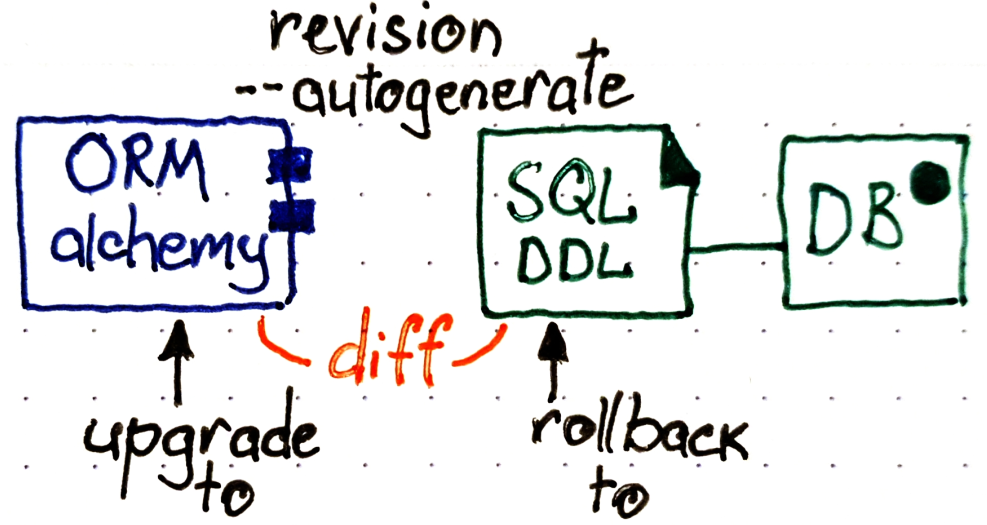
# step #1
alembic init datastorage_mysql

# step #2
# check your "sqlalchemy.url" in "ini file"
# check your "target_metadata" in "env.py"
# target_metadata = Base.metadata # from database.models import Base

# step #3
# generate current difference between model and
export PYTHONPATH=$PYTHONPATH:$(pwd)/src
alembic --config alembic-local.ini revision --autogenerate -m "baseline" 2>out.txt

alembic --config alembic-local.ini history

alembic --config alembic-local.ini upgrade head
delete from alembic_version where 1=1;rm datastorage_mysql/versions/*# step set marker in DB
# create table if not exists alembic_version
alembic --config alembic-local.ini current
# upgrade to specific revision
alembic --config alembic-local.ini upgrade cfaf8359a319 --sql - PySimpleGUI
 sudo apt-get install python3-tk
 pip3 install PySimpleGUI
- PyGUI
- Wax
- LibAvg
- PyGame
- PyQT5
pip install pyqt5
- Python Tkinter
- PySide 2
- Kivy
 pip install docutils pygments pypiwin32 kivy.deps.sd12 kivy.deps.glew
 pip install kivy
- wxPython
pip install wxPython
pip3 install psycopg2-binary
# need to execute: yum install rpm-build
pip3 install -U pipinstallation on Ubuntu
1. https://www.ibm.com/support/pages/mqc91-ibm-mq-clients?mhsrc=ibmsearch_a&mhq=mq%20client%20download
2. IBM MQ 9.1.0.20 LTS Clients
3. https://www.ibm.com/support/fixcentral/swg/selectFixes?parent=ibm%7EWebSphere&product=ibm/WebSphere/WebSphere+MQ&release=9.1.0.20&platform=All&function=fixId&fixids=9.1.0.20-IBM-MQC-*,9.1.0.20-IBM-MQ-Install-Java-All,9.1.0.20-IBM-MQ-Java-InstallRA&useReleaseAsTarget=true&includeSupersedes=0&source=fc
4. https://www.ibm.com/docs/en/ibm-mq/9.1.x?topic=mq-installing-uninstalling
5. https://www.ibm.com/docs/en/ibm-mq/9.1.x?topic=uninstalling-installing-mq-linux
6. unzip
7. installation
   sudo ./mqlicense.sh
   sudo dpkg -i ibmmq-runtime_9.1.0.20_amd64.deb
   sudo dpkg -i ibmmq-client_9.1.0.20_amd64.deb
   sudo dpkg -i ibmmq-sdk_9.1.0.20_amd64.deb
   ll /opt/mqm
   python -m pip install pymqi