Bug: "Please upgrade WeChat interface version in OpenClaw" when scanning the iLink Bot QR with the latest WeChat
TL;DR
Bundled iLink SDK in MiniMax Code 3.0.47 declares iLink-App-ClientVersion: 1 + bot_type=3 + SDK_VERSION=0.9.0 to Tencent's iLink Bot platform. Scanning the resulting QR with a current WeChat (Android or iOS) makes Tencent tell the WeChat client "your bot admin needs to upgrade the WeChat interface version in OpenClaw". The blocked UI is rendered by WeChat on the user's phone, not by MiniMax Code or OpenClaw.
Environment
- App: MiniMax Code 3.0.47 / 3.0.47.74
- OS (desktop): macOS 26.5.1 (Build 25F80)
- Phone: Android, latest WeChat
- OpenClaw Gateway: not installed (
~/.openclaw/ absent, port 18789 free)
Reproduction
- Open MiniMax Code on the desktop, signed in.
- Sidebar → IM/Chats → "add WeChat bot".
- MiniMax Code calls
POST /mavis/api/channel-bridge/wechat/bind/start and shows the QR it received from https://ilinkai.weixin.qq.com/ilink/bot/get_bot_qrcode?bot_type=3.
- User opens WeChat on Android (latest) and scans the QR.
- WeChat shows a system modal:
Please upgrade WeChat interface version in OpenClaw
[Done]
- The bind never completes (
POST .../wechat/bind/status keeps polling forever).
Screenshot from the user's WeChat on Android: 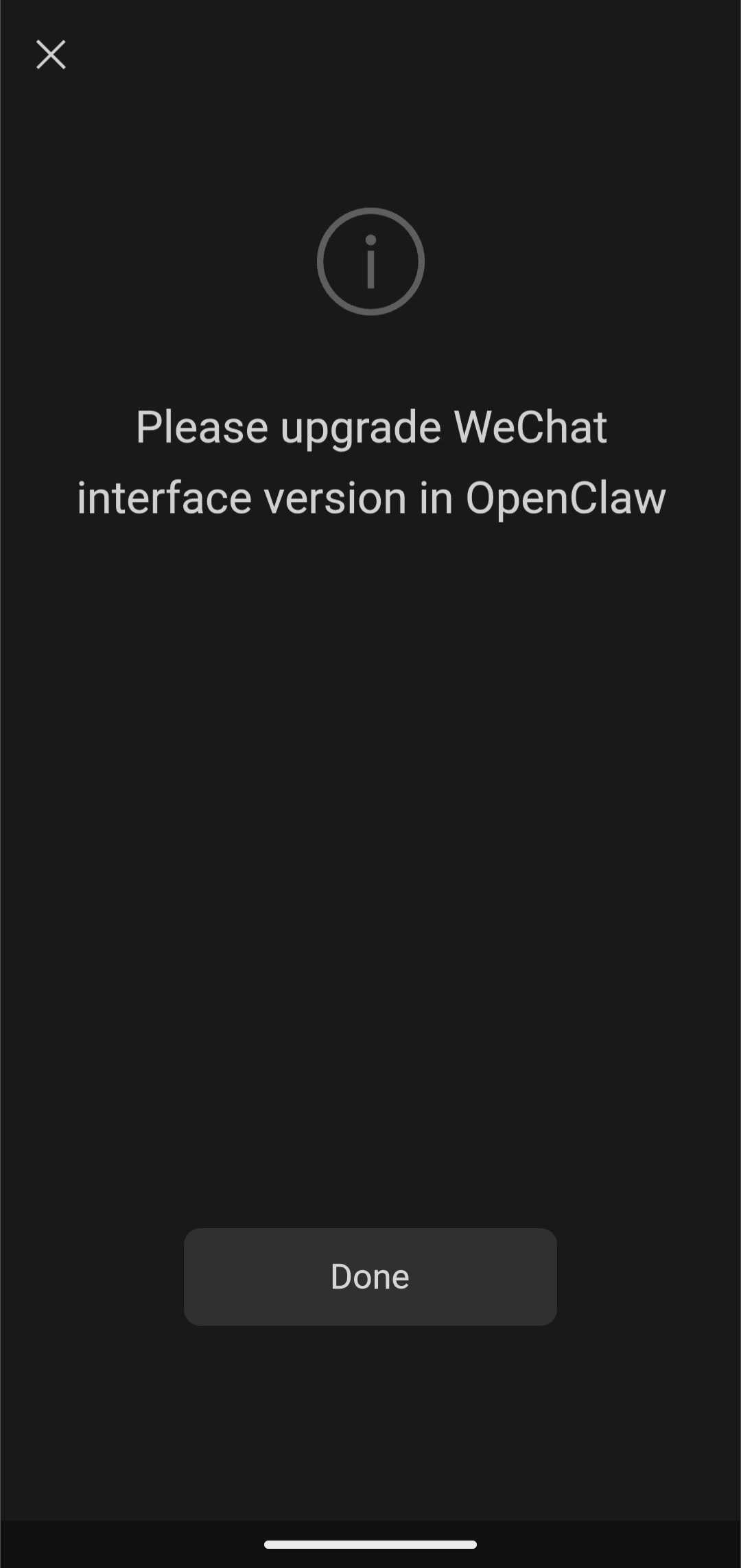
Expected
Either the QR shows as bound, or WeChat shows an actionable error that the user can resolve (e.g. "this bot is offline, try again later"). The current message asks the user to "upgrade the interface in OpenClaw" — but OpenClaw is not installed on this system, and there is no UI in MiniMax Code that exposes "upgrade WeChat interface version".
Root cause
dist/main/modules/imGateway/wechat-sdk/ — the standalone iLink Bot SDK that ships inside MiniMax Code — talks to https://ilinkai.weixin.qq.com with three hardcoded identifiers that are all on the lowest / pre-release version:
| File:line |
Constant |
Value |
ilink-auth.js:15 |
DEFAULT_BASE_URL |
https://ilinkai.weixin.qq.com |
ilink-auth.js:16 |
DEFAULT_BOT_TYPE |
'3' |
ilink-auth.js:90 |
HTTP header |
iLink-App-ClientVersion: '1' |
ilink-client.js:21 |
SDK_VERSION |
'0.9.0' |
The QR is requested from:
GET https://ilinkai.weixin.qq.com/ilink/bot/get_bot_qrcode?bot_type=3
and the status poll carries the iLink-App-ClientVersion: 1 header.
When the user scans that QR with a recent WeChat build, Tencent's iLink Bot service compares the protocol version it sees from the bot (1 / 0.9.0) against what the current WeChat client supports. Mismatch ⇒ the WeChat client is told to display "Please upgrade WeChat interface version in OpenClaw" and refuse the binding.
This is purely a client-side version handshake between MiniMax Code's SDK and Tencent's iLink server — it has nothing to do with whether OpenClaw Gateway is installed locally. The key name in the error message ("interface version in OpenClaw") refers to the OpenClaw WeChat integration as a logical component, not to a separate Gateway process.
Evidence from the user's logs
~/Library/Logs/MiniMax Agent/daemon-2026070304.log shows the bind attempts go through the standalone iLink path, not OpenClaw:
POST /mavis/api/channel-bridge/wechat/bind/start   status=200  duration≈700ms  (×5 retries, 05:22–05:55)
GET  /mavis/api/channel-bridge/wechat/bind/status  status=200  duration≈1ms   (polling every ~3s)
No OPENCLAW_STATUS_CHANGED event was emitted, which confirms the OpenClaw WebContentsView was never opened. The desktop side is fine — the failure happens when the phone's WeChat app rejects the version the desktop SDK declares.
Suggested fixes
- Bump the version constants (most likely this alone resolves the bug):
ilink-auth.js:16 — change DEFAULT_BOT_TYPE from '3' to whatever Tencent now requires (try '4' first; if that breaks, read the official iLink docs in the AstrBot reference cited in dist/main/modules/imGateway/platforms/wechat.js:64).ilink-auth.js:90 — change the iLink-App-ClientVersion header to the current value (mirror what the upstream AstrBot project uses).ilink-client.js:21 — bump SDK_VERSION.
- Surface a human-readable error when the polling response carries an
errcode that indicates a version mismatch, so the user isn't left staring at a never-resolving spinner.
- Pin the constants from a single source of truth so the bot_type / client version / SDK version stay in lockstep across the three files.
- While here: a private "self-test" command on the daemon side that hits
get_bot_qrcode and logs the exact headers/response would catch this kind of drift in CI instead of in production.
Notes on the previous diagnosis
I initially reported this as an OpenClaw-WebContentsView issue (issue body revision was based on the desktop screenshot interpretation). User clarification: the screenshot is from the Android WeChat client, not from MiniMax Code's UI. Updated root cause accordingly.
Bug: "Please upgrade WeChat interface version in OpenClaw" when scanning the iLink Bot QR with the latest WeChat
TL;DR
Bundled iLink SDK in MiniMax Code 3.0.47 declares
iLink-App-ClientVersion: 1+bot_type=3+SDK_VERSION=0.9.0to Tencent's iLink Bot platform. Scanning the resulting QR with a current WeChat (Android or iOS) makes Tencent tell the WeChat client "your bot admin needs to upgrade the WeChat interface version in OpenClaw". The blocked UI is rendered by WeChat on the user's phone, not by MiniMax Code or OpenClaw.Environment
~/.openclaw/absent, port 18789 free)Reproduction
POST /mavis/api/channel-bridge/wechat/bind/startand shows the QR it received fromhttps://ilinkai.weixin.qq.com/ilink/bot/get_bot_qrcode?bot_type=3.POST .../wechat/bind/statuskeeps polling forever).Screenshot from the user's WeChat on Android:
Expected
Either the QR shows as bound, or WeChat shows an actionable error that the user can resolve (e.g. "this bot is offline, try again later"). The current message asks the user to "upgrade the interface in OpenClaw" — but OpenClaw is not installed on this system, and there is no UI in MiniMax Code that exposes "upgrade WeChat interface version".
Root cause
dist/main/modules/imGateway/wechat-sdk/— the standalone iLink Bot SDK that ships inside MiniMax Code — talks tohttps://ilinkai.weixin.qq.comwith three hardcoded identifiers that are all on the lowest / pre-release version:ilink-auth.js:15DEFAULT_BASE_URLhttps://ilinkai.weixin.qq.comilink-auth.js:16DEFAULT_BOT_TYPE'3'ilink-auth.js:90iLink-App-ClientVersion: '1'ilink-client.js:21SDK_VERSION'0.9.0'The QR is requested from:
and the status poll carries the
iLink-App-ClientVersion: 1header.When the user scans that QR with a recent WeChat build, Tencent's iLink Bot service compares the protocol version it sees from the bot (
1/0.9.0) against what the current WeChat client supports. Mismatch ⇒ the WeChat client is told to display "Please upgrade WeChat interface version in OpenClaw" and refuse the binding.This is purely a client-side version handshake between MiniMax Code's SDK and Tencent's iLink server — it has nothing to do with whether OpenClaw Gateway is installed locally. The key name in the error message ("interface version in OpenClaw") refers to the OpenClaw WeChat integration as a logical component, not to a separate Gateway process.
Evidence from the user's logs
~/Library/Logs/MiniMax Agent/daemon-2026070304.logshows the bind attempts go through the standalone iLink path, not OpenClaw:No
OPENCLAW_STATUS_CHANGEDevent was emitted, which confirms the OpenClawWebContentsViewwas never opened. The desktop side is fine — the failure happens when the phone's WeChat app rejects the version the desktop SDK declares.Suggested fixes
ilink-auth.js:16— changeDEFAULT_BOT_TYPEfrom'3'to whatever Tencent now requires (try'4'first; if that breaks, read the official iLink docs in the AstrBot reference cited indist/main/modules/imGateway/platforms/wechat.js:64).ilink-auth.js:90— change theiLink-App-ClientVersionheader to the current value (mirror what the upstreamAstrBotproject uses).ilink-client.js:21— bumpSDK_VERSION.errcodethat indicates a version mismatch, so the user isn't left staring at a never-resolving spinner.get_bot_qrcodeand logs the exact headers/response would catch this kind of drift in CI instead of in production.Notes on the previous diagnosis
I initially reported this as an OpenClaw-WebContentsView issue (issue body revision was based on the desktop screenshot interpretation). User clarification: the screenshot is from the Android WeChat client, not from MiniMax Code's UI. Updated root cause accordingly.